
DemandSage has now partnered with WebinarJam. This partnership brings a 14-day trial for just $1. Plus you get a 30% discount on monthly and annual plans by using our verified coupon DEMAND30 during checkout.
The 14-day trial gives you access to all the WebinarJam tools that you need to host your live webinar.
Note: While signing up for the free trial, use our coupon “DEMAND30” to get 30% off when your free trial plan is over. You will get a discount when you use the coupon while signing up for the free trial.

WebinarJam 14-Days Trial — Use Code “DEMAND30”
While signing up for the trial, use our coupon “DEMAND30” to get 30% off when your free trial plan is over.

In this article, we will guide you through claiming your free trial using the coupon with a step-by-step guide. Be sure to read the article to the end for exclusive WebinarJam discounts and offers!
So, let’s read more of the details below!
WebinarJam 30-day Free Trial Availability
WebinarJam stopped its “30-day trial at $1” offer. It is no longer accessible anywhere.
Previously, WebinarJam offered a 60-day free trial as well to its users. Unfortunately, the offer was discontinued and replaced with a 30-day free trial. However, the 30-day trial for $1 was also discontinued soon after.
Now, users can only get a 14-day free trial for $1.
WebinarJam 14-Days Trial — Use Code “DEMAND30”
While signing up for the trial, use our coupon “DEMAND30” to get 30% off when your free trial plan is over.
While the WebinarJam free trial isn’t completely ‘free,’ you can test out all the features of WebinarJam and see if it is the right fit for you at just $1.
This means you can pay $1 for any plan of your choice and enjoy it for 30 days. You can also use our exclusive WebinarJam Coupon Code – DEMAND30 to get a 30% discount after the trial is over.
Well, if you believe us, the $1 option is an excellent way to use one of the best webinar platforms on the internet and see if the hype is real or not!
How to Claim Your WebinarJam Free Trial Coupon (Step-By-Step)
Now that you know about the free trial of WebinarJam, it is time to claim your 30-day coupon.
Here is our step-by-step guide on how to claim your WebinarJam free trial in a few steps. Use the code “DEMAND30” while signing up for the free trial.
Step 1: Use our exclusive 14-day free trial link for WebinarJam. Click the “Yes! Start My $1 Trial” option from the on-screen pop-up.
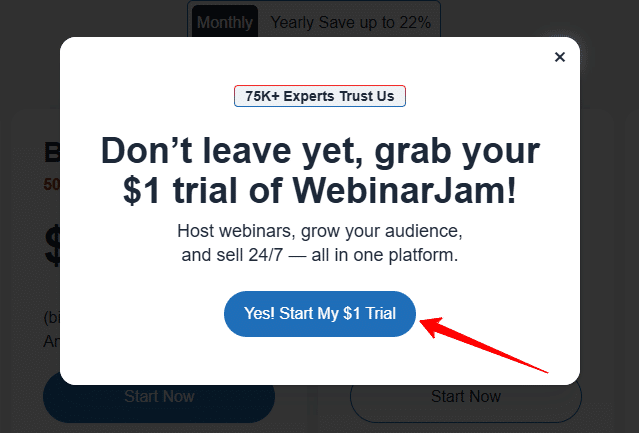
The trial pop-up appears after a few seconds. So please wait for some time. Otherwise, there is no option to continue with the $1 trial.
Step 2: Choose the plan that fits your needs. If you are a beginner, you can try WebinarJam with the Starter plan. If you already have a good audience and want to host a large webinar, you can opt for the Basic or Professional Plan.

Step 3: A pop-up will appear again on your screen for the checkout option. Enter all the details, including your name, email address, phone number, country, code, etc., as asked on your screen. Once done, click on the continue option.

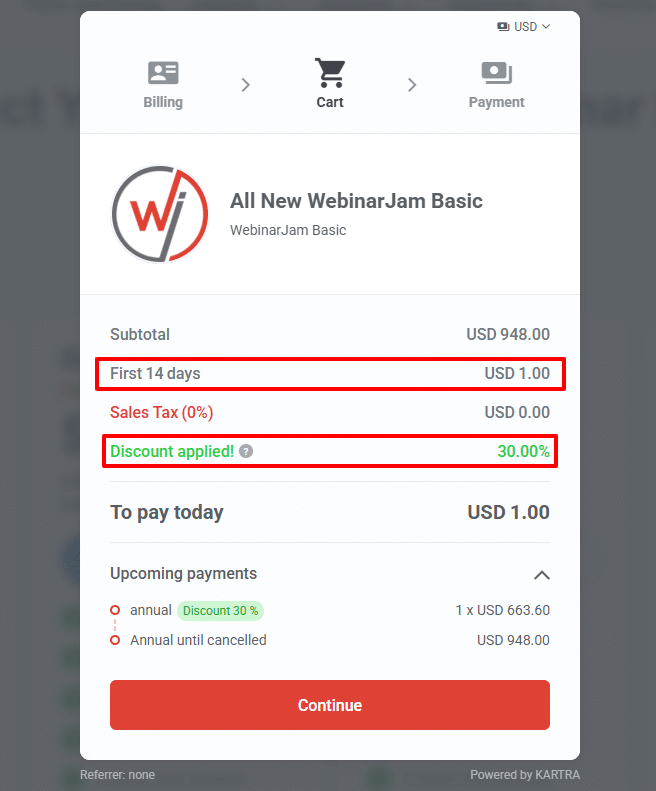
Step 4: Another pop-up will appear on your screen with the total billing amount of $1. Tap on the ‘Continue’ option. Here, I have also added the coupon “DEMAND30”, so you can see the 30% discount offer that you can grab after the trial.
Step 5: Enter your card details. WebinarJam accepts all the popular cards, including Visa, MasterCard, Amex, and Discover. Read the terms and conditions and accept them.

Step 6: Confirm your payment.
Congratulations! You have claimed your 14-day free trial of WebinarJam at just $1.
Who is WebinarJam Best For?
WebinarJam is an amazing Webinar software that you can use to host live webinars and sell them as a business. This is the right software to have if you’re planning for a long-term webinar strategy.
Simply put, WebinarJam is an excellent choice if:
-
You are an online course instructor, and you need to take live classes with your students.
-
You are a business owner, and you need to introduce your new product to your audience and also get real-time reviews from them.
-
You are searching for a webinar tool to arrange live events for a huge audience.
-
Looking for a webinar tool that allows you to interact with your audience through polls and live chat.
-
You want to sell your webinars as a business and provide value to your audience through live webinars.
WebinarJam Free Trial: What Can You Do Within 14 Days
One thing about WebinarJam’s free trial is the additional perks you get. Some unique features you can enjoy with the WebinarJam free trial include:
-
Unlimited webinars.
-
Start live, recurring, or pre-recorded webinars.
-
A/B split testing.
-
Live chat option for all webinars.
-
Password-protected rooms for webinars.
-
Creating polls and engaging surveys.
-
Customizable and eye-catching registration templates.
-
24/7 expert customer support.
-
Drawing board for webinars to display visuals.
-
Email and SMS system.
-
Custom backgrounds.
Usage Limit During WebinarJam 14-Day Trial
While the WebinarJam $1 trial gives you access to the platform before committing to a paid plan, it does not include the full capabilities of your selected plan. To prevent the misuse of the WebinarJam $1 trial, the platform has put some usage limits regardless of the plan you pick for the trial.
Here’s the usage limit during your trial, so you will have a clear picture of what you are getting for your time:
| Feature | Usage Limit |
|---|---|
| Maximum Attendees | 500 Per Webinar |
| Hosts | 2 Per Webinar |
| Webinar Duration | 2 Hours Max |
| Team Members | 5 Additional Member Seats |
| Email Invitation | Max 500 Sent from Registration Pages |
| API | Not Available During Trial |
| Automation | Not Available During Trial |
Once the trial is over and you continue with our WebinarJam discount, this restriction will be gone. You will be able to use all the features shown on the pricing page.
WebinarJam Pricing
Once your trial ends, you can switch to its paid plans. The best part is, after the trial period, you can subscribe to WebinarJam and get up to a 22% discount when subscribed annually! What’s better is that you can use the coupon “DEMAND30” to unlock the 30% discount on top of the annual discount.
Let’s check out the pricing options for WebinarJam below!

| Features | Starter | Basic | Professional | Enterprise |
|---|---|---|---|---|
| Monthly Pricing | $49/month | $99/month | $299/month | $499/month |
| Annual Pricing | $39/month | $79/month | $229/month | $379/month |
| Attendees | 100 | 500 | 2000 | 5000 |
| Number Of Hosts | 1 | 2 | 4 | 6 |
| Maximum Duration | 1 hour | 2 hours | 3 hours | 4 hours |
| Live Offer Displays | ✅ | ✅ | ✅ | ✅ |
| On-screen Whiteboard | ✅ | ✅ | ✅ | ✅ |
| Custom Backgrounds | ✅ | ✅ | ✅ | ✅ |
| Bad Words Filter | ✅ | ✅ | ✅ | ✅ |
| A/B Split Testing | ✅ | ✅ | ✅ | ✅ |
| Attendee Spotlight | ❌ | ✅ | ✅ | ✅ |
| Automated Webinars | ❌ | ✅ | ✅ | ✅ |
| Always On Live Room | ❌ | ❌ | ✅ | ✅ |
| The Panic Button | ❌ | ❌ | ✅ | ✅ |
| Control Panel | ❌ | ❌ | ❌ | ✅ |
Depending on your needs, you can choose the plan that suits you best. For beginners and small businesses, the Starter and Basic plans work the best.
Similarly, if you are a medium- to large-sized business owner, you can opt for the Professional and Enterprise plans.
However, with the free trial, you can grab any plan at $1 for two weeks.
EverWebinar is another webinar platform run by the same parent company, Genesis Digital. The difference is that EverWebinar hosts pre-recorded webinars, while WebinarJam hosts live interactive webinars. You can learn more about the difference between WebinarJam vs EverWebinar with our detailed comparison here.
Other free trials you might want to check out
Is WebinarJam Worth Paying?
If your purpose is to host live webinars, WebinarJam is worth giving a shot.
WebinarJam is packed with robust features like high-quality live webinars, live chat, polls, surveys, integrations, recordings, and the capability to handle up to 5000 attendees (depending on the plan).
Compared to other competitors, WebinarJam’s basic plan starts at $39/month, which includes all these essential features to host unlimited live webinars. Plus, the 14-day free trial at $1 is enough to test all these features by yourself.
Bonus: If you are searching for more options, you can roll over to our list of the best Webinar software that we shortlisted. The list includes both free and paid software.
Does WebinarJam Offer a Money-Back Guarantee?
WebinarJam offers a 30-day money-back guarantee on all its premium plans. If you are not satisfied with the services and platform features, you can cancel your subscription within 30 days of purchase.
Once your account is deactivated, you will receive a 100% refund with no questions asked.
Remember that the refund policy is only applicable to first-time users. If you have been a subscriber for a while, you won’t be able to claim the refund.
Final Thoughts: Try WebinarJam for 14 Days with a $1 Coupon
The 30-day and 60-day WebinarJam trial are no longer available. But the WebinarJam 14-day trial at just $1 through our partnership is still a good deal to test all your webinar needs.
Exclusive WebinarJam 14-Days Trial
Experience WebinarJam 14-day free trial for just $1! Elevate your virtual events now!
Our guide mentioned above will help you claim your free trial in no time.
The WebinarJam free trial is an exclusive offer available for a limited time only. So, go ahead and grab your WebinarJam free trial right away!
FAQs
Technically, you cannot use WebinarJam entirely for free. However, you can claim a 14-day free trial by paying just $1. The steps mentioned above will help you claim your free trial in no time.
Yes! WebinarJam comes with a 30-day risk-free refund policy. You can cancel your subscription within the first 30 days of your purchase and claim a full refund.
There is no free plan for WebinarJam currently. However, you can test all the features of the platform at $1 for 14 days.
You can cancel the subscription by raising a ticket with the WebinarJam support team. You need to provide all your details, and the team will reach out to assist you.
Unfortunately, no. WebinarJam only provides annual plans. Once you opt for a plan, you will have to make a one-time payment.
