
Most of the money lost in Amazon arbitrage is lost before a product ever sells. You buy stock you turn out not to be allowed to list. You run your numbers against a fee table that is out of date. You trust a single day’s price without seeing that it has been sliding for months. Each mistake is small on its own, but across a full sourcing session they add up fast.
The SmartScout Chrome extension exists to catch those mistakes on the listing, before you spend anything. It sits on the Amazon page and fills in profit, ROI, live Amazon fees, eligibility, and price and rank history the moment you land on a product. It is built for online arbitrage and wholesale sellers, and the best part is that it costs nothing: 1,000 full-feature uses a month, no card required.
Below, I broke down what the SmartScout Chrome extension does, how to set it up, and explained every feature on the panel.
SmartScout Chrome Extension – Key Summary
- SmartScout’s Chrome extension is completely free to use (1,000 full feature uses per month)
- Real-time data like fees and prices directly from Amazon (SP-API)
- Built for Online Arbitrage wholesale sellers running businesses on Amazon.
- Runs entirely on the Amazon listing itself, so profit, ROI, and fees appear before you finish reading the title.
- It flags gated and restricted items on the page, so you stop buying stock you cannot actually list.
- Shares one login with the full SmartScout platform, carrying your work from quick page checks into deeper brand and category research.
Want the deeper research side later? The paid platform starts at $49 a month, and the code GOFBA25 takes 25% off your first three months. You can find more ways to save on our SmartScout coupon code page.
What Does the SmartScout Chrome Extension Do?
SmartScout turns a plain Amazon product page into a sourcing dashboard. You don’t have to leave the page to check anything. All product-related details appear on the listing you have opened.
On a single product, you will get:
- Profit and ROI, with every Amazon fee pulled in for you
- A single opportunity score, so you can size up a product at a glance
- Your selling eligibility, plus any restrictions on that item
- History charts for price, Buy Box, offer count, ratings, and rank
- Brand-level signals for wholesale sourcing
- One-click copy for ASINs, titles, and UPCs
It does not replace the full SmartScout platform. The extension handles the product-level checks while you browse, and the full app covers the wider category, brand, and seller research, which is explained near the end.
How to Install the SmartScout Chrome Extension
You can install and set up the SmartScout Chrome extension within 2 minutes. Just follow these steps:
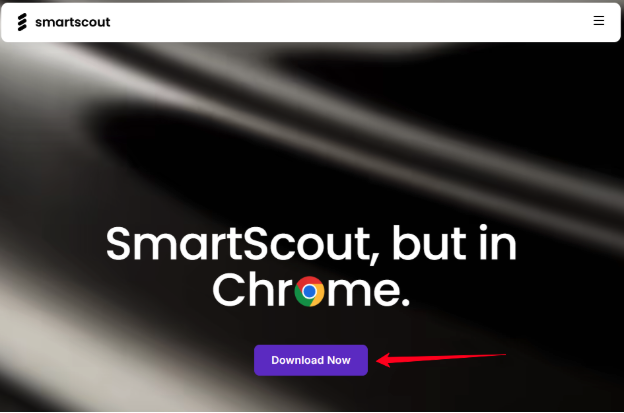
Step 1. Download the SmartScout extension from the official SmartScout page. Click Download Now.
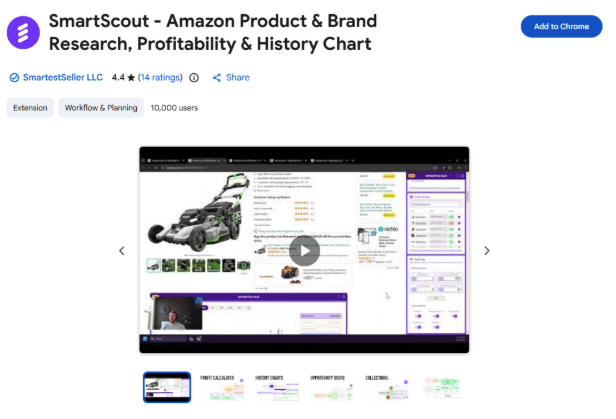
Step 2. Click “Add to Chrome” from the Chrome Web Store. Then, pin it to the toolbar.
Step 3. When you open an Amazon page, the extension will ask you to sign in or create a free account.
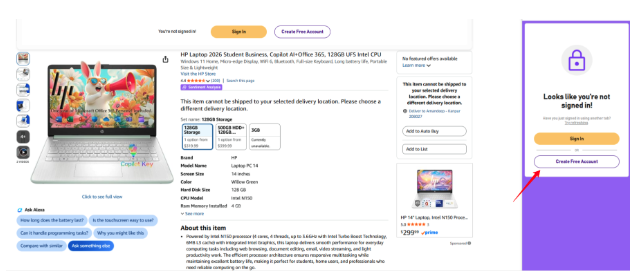
As a new user, you can create a free account using your email address and phone number.
Once you are logged in, you can use the extension tools to see the data of individual pages or results pages.
How Does the SmartScout Chrome Extension Work?
Once installed, the extension reads the product you are viewing and requests its data through Amazon’s SP-API. A second or two later, the panel fills in with the profit math, the opportunity score, eligibility, and the charts.
Here is how that plays out. Say you are working down a wholesale price list and land on a kitchen gadget selling for $24.99. The panel already shows the referral fee, the FBA fee, and the ROI before you finish reading the title.
Enter a supplier cost of $9, and the net profit and margin appear right away. If the margin is thin, you move to the next item without switching tabs once.
That is the loop: browse, read the panel, decide, move on. Each check saves about a minute, and screening a hundred products in a session turns into hours saved over a week. Sourcing speed matters more than it used to, and these Amazon statistics show how crowded the marketplace has become.
SmartScout Chrome Extension Features
Here are all the features you can use while running the SmartScout Chrome extension on an Amazon product page:
1. Product Opportunity Score
The extension combines several reseller-relevant factors into a single score, so you can judge a product without reading five metrics separately. That is the fastest way to work through a supplier catalog with hundreds of rows.
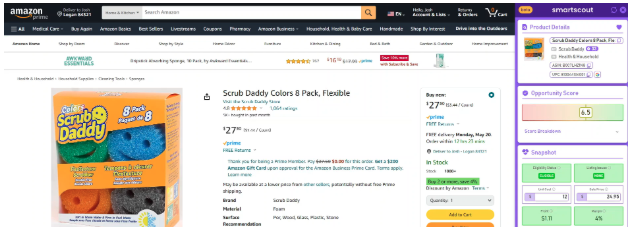
You scan the scores, let the low ones fall away, and spend time only on the products worth a closer look. The score does not replace your own judgment on the shortlist, but it handles the first cut, which on a long list is the difference between finishing a catalog in an afternoon and dragging it across two days.
2. FBA Calculator (Simple & Advanced)
There are two versions of FBA Calculator. The simple one takes your cost of goods, the selling price, and Amazon’s fees, and returns ROI and expected profit. The advanced one adds prep, inbound shipping, and per-unit handling for a number closer to what you will actually keep.
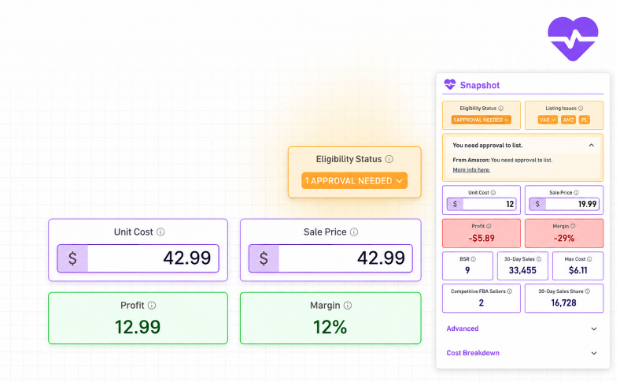
Because the referral and FBA fees come live from Amazon, you are not estimating them or working off an outdated fee table. Take that $24.99 kitchen gadget from earlier.
A $9 cost against a $24.99 sale price looks like a healthy spread on the surface, but once the live referral and fulfillment fees load, the real margin is much tighter.
The advanced view shows that before you commit a dollar, which is where the difference between a deal that looks profitable and one that is profitable gets settled.
3. Instant Eligibility Status & Resolution
Buying stock you are not allowed to sell is one of the most common ways to lose money on Amazon. The extension shows whether you are eligible to list a product before you spend anything on it. If the item is gated or restricted for your account, it flags that on the page instead of leaving you to find out weeks later when the inventory is already sitting at a prep center.
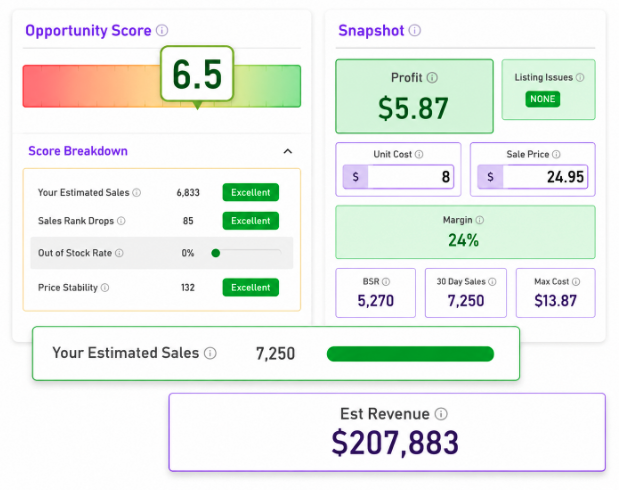
For arbitrage this matters most. There is nothing worse than filling a cart and learning at home that half of it cannot be listed. Seeing eligibility on the listing means you only chase products you can sell, and the resolution side points you toward gates you might be able to open rather than hard walls.
4. Listing Issues Drill-Down
A plain pass or fail is not always enough. The drill-down lets you see the specifics behind a listing, the detail you would normally hunt for inside Seller Central. You can see what is keeping a product gated or which condition and category rules apply.
This is useful on products that look strong on margin but where you want to be sure there is no catch before buying in volume. Knowing why a product is restricted tells you whether it is worth trying to get ungated or whether to walk away before making a hopeful bulk purchase.
5. History Charts
A single day’s snapshot tells you very little on Amazon, which is why the history charts are one of the most useful parts of the panel. From there, you can view historical Buy Box and Amazon price, new offer count, rating count, average rating, and category and subcategory.
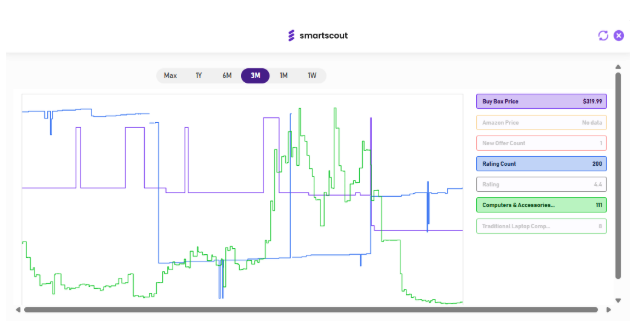
Read these charts for patterns rather than single points. A Buy Box price that has held steady with a stable offer count points to a calmer listing where your margin has room to survive. A price that swings up and down, or an offer count that keeps climbing week after week, means competition is crowding in and today’s numbers may not hold once you have inventory on hand. A product that looks fine in the moment often shows a clear downward price trend over the past few months, and the chart is what catches it.
6. Brand Opportunities
For wholesale sourcing, brand-level signals are worth a lot. The extension surfaces opportunity data tied to the brand behind a product, not just the single item. That matters because wholesale is rarely a decision about one SKU. It is a decision about whether to open an account with a brand and carry a range of their products.
Knowing the shape of a brand on Amazon before you reach out saves time. Weak signals mean you skip the outreach and avoid chasing an account that was never going to pay off. Strong ones mean you go into that conversation already knowing there is room to make it work.
7. Quick Copy & Lookup Tools
You can copy an ASIN, title, or UPC in one click, and run a UPC lookup to match a supplier’s item against the live Amazon listing. Each action is tiny, but reconciling a supplier sheet a few hundred times a week adds up to real hours.
The UPC lookup also prevents a common mistake: matching an item to the wrong listing and running your numbers against a product you are not actually buying.
8. Collections (Save Products for Later)
When a product is worth a second look but not an immediate buy, you can save it to a collection instead of leaving a browser tab open and hoping to remember it.
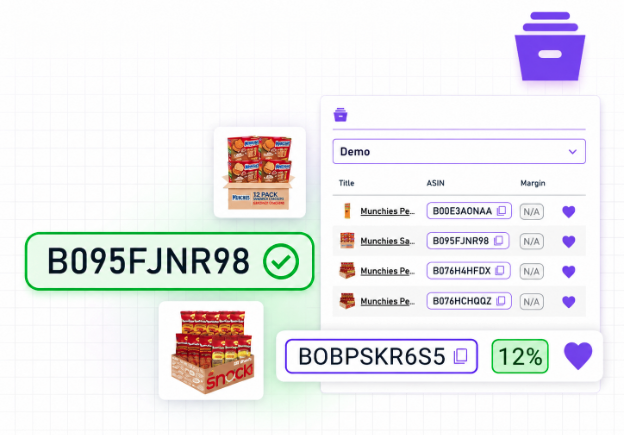
Sourcing rarely happens in one sitting, and collections give you a clean shortlist to return to and clear out as you make your buys, so nothing promising slips through.
9. Saved Presets & Customization
The customization lets you set the extension up around the way you work. Save the recurring costs you apply on most deals, adjust the layout, and choose which data points sit front and center.
Once your presets are in place, every product page shows the numbers you care about in the order you want them, with no re-entry. With your standard prep cost and preferred metrics already loaded, checking a product becomes a glance rather than a setup exercise.
How the Chrome Extension Connects to the Full SmartScout Platform
The extension and the SmartScout platform share a name but do different jobs, and it is worth being clear on the split.
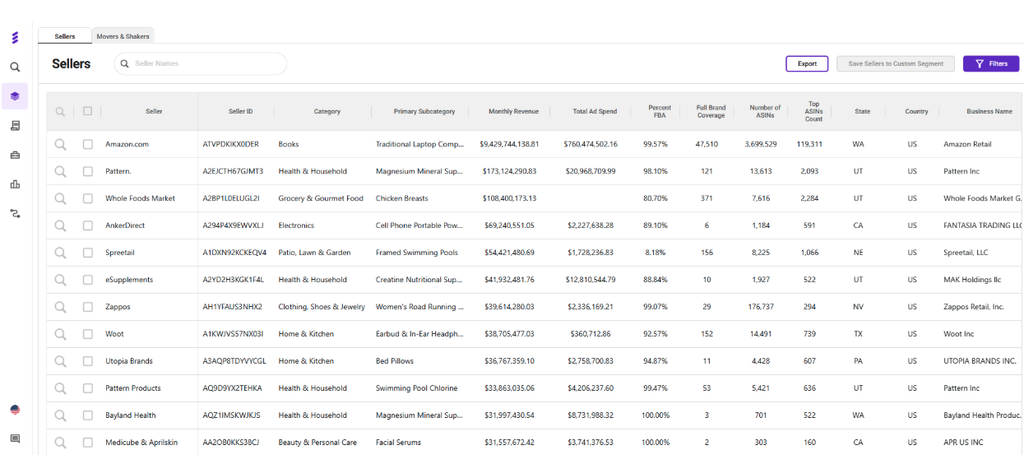
The extension is the execution tool. It answers the product-level questions you have while browsing a listing: is this profitable, can you sell it, does the trend look healthy? The platform is the planning tool, where you explore categories and subcategories, work out which brands own a niche, map sellers, and look for rising products across the whole marketplace.
Your account connects the two. The Basic plan covers product research and the Chrome extension together, so the same login carries your work from quick page checks into the heavier research suite as your sourcing gets more serious. Many sellers run both. If you want to explore that deeper side first, the SmartScout free trial options are a low-risk way to look around.
SmartScout Chrome Extension Pricing & Free Tier
SmartScout itself is free. You get 1,000 full-feature uses a month with no card on file, which for a solo seller or a small team covers daily sourcing without bumping the limit.
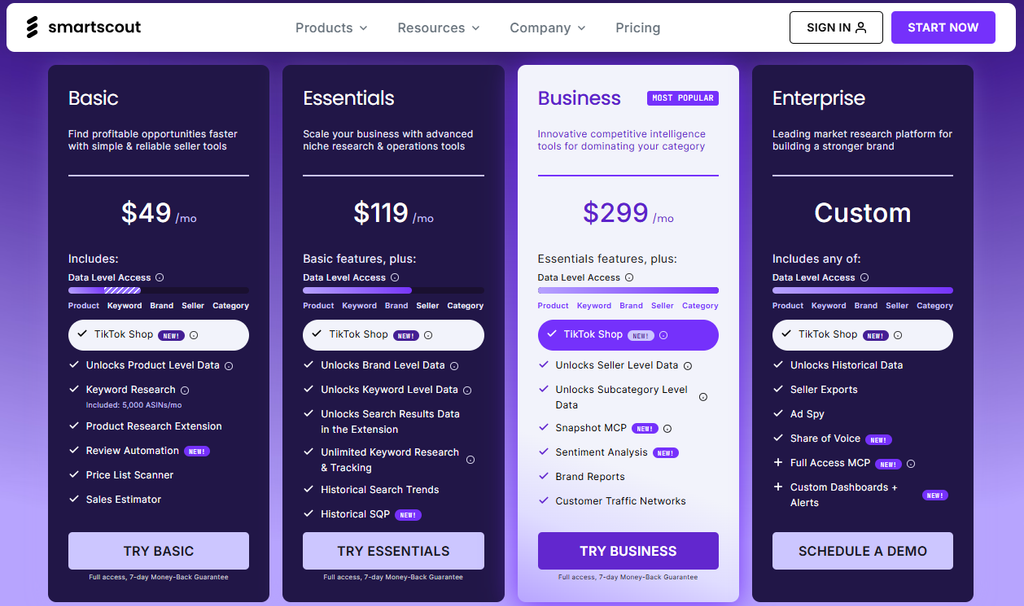
If you outgrow it and want the full platform, here is how the paid plans line up. I’ve broken all of that down in the SmartScout pricing section further down.
| Plan | Monthly | Yearly | Best for |
|---|---|---|---|
| Plan | Monthly | Yearly | Best for |
| Basic | $49/mo | $29/mo | First-time sellers |
| Essentials | $119/mo | $99/mo | Resellers and private label |
| Business | $299/mo | $239/mo | Growing brands and agencies |
| Enterprise | Custom | Custom | Large brands and agencies |
Basic is the plan that bundles the Chrome extension with product research and the FBA profit calculator. Essentials adds seller search and higher usage limits, Business opens up fuller analytics and exports, and Enterprise brings API access and custom data for larger operations.
The coupon GOFBA25 takes 25% off your first three months on any plan. There is no traditional free trial, but every paid plan comes with a 7-day money-back guarantee, so you can test the platform and request a refund if it does not fit.
Pros & Cons of SmartScout Chrome Extension
After using the SmartScout Chrome extension, here is how its pros and cons look:
Pros:
- The free tier is genuinely usable, not a teaser: 1,000 full-feature uses a month with no card required, which covers daily sourcing for most solo sellers and small teams.
- Referral and FBA fees pull live from Amazon’s SP-API, so your ROI and margin sit on real numbers instead of an outdated fee table.
- Eligibility and restriction checks show on the listing before you spend a dollar, which is the single biggest way arbitrage sellers avoid dead inventory.
- The whole check happens on the page, turning a five-tab process into a glance and saving close to a minute per product.
- The same account connects to the full platform, so the extension grows with you instead of becoming a dead end.
Cons:
- The extension only answers product-level questions; wider category, brand, and seller research still needs the paid platform.
- It is built for Chrome, so sellers who work in other browsers are left out.
Conclusion: Start with SmartScout Chrome Extension for Free
The SmartScout Chrome Extension does one job well: it makes the buy-or-skip call on a product faster and more reliable. The opportunity score trims the list, the calculators confirm the margin with live fees, eligibility keeps you out of trouble, and the history charts show what you are walking into, all on the page you are already viewing, for free.
For arbitrage and wholesale sellers, it belongs in the toolbar. For private label, it is still a useful research shortcut, even though the paid platform carries more of the load.
Since it costs nothing to install and gives you 1,000 uses a month, it is worth running against your next sourcing session to see how much time it hands back.
FAQs
SmartScout is free to install and includes 1,000 full-feature uses a month, with no contract and no credit card required.
The extension works on its own with a free account. A paid plan raises your usage limits and unlocks the full research platform, but you do not need it to use the extension.
SmartScout states that it does not collect or store individual seller data from the Amazon Seller API. It processes product information through the API to show you insights, and nothing beyond that.
It connects through Amazon’s SP-API and works on Amazon product and search pages, with the US marketplace as the main focus. Coverage can vary by region, so check the current listing if you sell in a specific country.
It layers data onto both product pages and search results, so you can scan a full page of listings without opening each one.
