
Note: Elementor Cloud Website is now called Elementor WordPress Hosting, offering new features and multi-site plans. The platform is hosted on Google Cloud and provides an all-in-one solution for WordPress website creation and hosting
Elementor Cloud Website can be a lifesaver for web creators. Buckle up; it’s gonna be a hell of a ride!
This in-depth Elementor Cloud review will help you get detailed insights into the Elementor Cloud Website. I’ll be sharing:
- What makes Elementor Cloud stand apart?
- What does Elementor Cloud Website offer?
- How to Get Started With Elementor Cloud (Interface)
- What’s the pricing of Elementor Cloud?
Elementor WordPress Hosting 2026
Elementor WordPress Hosting is an all-in-one solution for website owners.🎯
Check Elementor’s promotional page for any active offers. 🔥
So without further ado, let’s get straight into it.
Elementor WordPress Hosting: In a Nutshell
Elementor launched the Elementor Cloud Website on 22nd February 2022. I even attended the live launch event of Elementor Cloud, where I got a chance to hear from the founders of Elementor.
Elementor Cloud is a hosting service provided by Elementor itself and is hosted on Google Cloud.

To put it simply, you can host a WordPress website with Elementor hosting, design your website with the Elementor Pro plugin, and manage everything from an easy-to-use dashboard.
All you need to do is choose the Elementor Cloud Website plan and enter your domain name. Wait for a few seconds; WordPress will be installed really quickly, and you will be able to access your website’s WP dashboard quickly.
Note: Elementor Cloud Website makes it possible to connect your custom domain to the Elementor Cloud Website.
What Makes Elementor WordPress Hosting Stand Apart?
Most hosting providers come with various hidden fees for SSL, CDN, backups, bandwidth, etc. And even after paying a premium price, a WordPress website owner isn’t satisfied with a complex interface, slow customer support, and, sometimes, slow website loading time.
To fill up this gap of hidden charges and technical aspects of WordPress hosting, Elementor Cloud is the one-stop solution for you.
Gone are the days when you have to find a domain registrar to register a domain and choose a hosting provider to host your domain. Here’s the future — Elementor Cloud Website.

Besides hosting, you can connect your Elementor Pro license with Elementor Cloud hosting plans. With the help of the Elementor Pro plugin, you can easily create a stunning WordPress website without writing a single line of code. Elementor Cloud is going to be the notch competitor of Wix and Squarespace, which helps you host and create websites on the go.
That means you’re getting fast, feature-packed cloud hosting + a premium website builder (Elementor Pro), and premium Elementor support. Everything just by paying — $99/ yearly.
Note: Don’t judge me if I’m praising a lot. Hear me out; I have used premium WordPress hosting (WPX Hosting), costing $24 a month, which goes around $250 yearly. I have a streamlined solution with fast hosting and the Elementor Pro plugin for $99 yearly.
What Elementor Cloud Has to Offer?
In this section, I’ll share what you’re getting with Elementor Cloud hosting — all the perks and features listed.
-
Instant Hosting Setup: Once you purchase the plan and enter the necessary details, everything will be set up — WordPress CMS, Elementor Hello theme, Elementor Pro features.
-
Free SSL Certificate: Yes, Elementor Cloud hosting has pre-installed SSL from Cloudflare. This helps you add an extra layer of security to your WordPress website.
-
Free CDN: Yes, Elementor Cloud also comes with CDN (content delivery network) powered by Cloudflare. Using the CDN, you can deliver your website’s content quickly, increasing the user experience.
-
Custom Domain: You have the option to connect multiple custom domains to the Elementor website for FREE. You can purchase the domain with any domain name provider.
-
20 GB Storage: The amount of storage you get to keep your website content up.
-
100 GB Bandwidth: Offering 100GB of Bandwidth to help you handle a lot of traffic without slowing down your website server.
-
100K Monthly Visits: Yes, the assigned server could easily manage the load of 100K monthly users or IPs.
-
Automatic Backup: Yes, the Elementor Cloud Website also has automatic website backups. It comes with day and night backups, which are stored for 14 days. What’s more, you also have the option to create manual backups as per your needs.
-
Free Elementor Subdomain: Yes, the Elementor Cloud Website also provides a free subdomain that will look like this — exampal@elementor.cloud
These are the features and perks you will get with the Elementor Cloud Website. What’s more, the Elementor Website Hosting also comes with Elementor Pro.
If you don’t have an idea what Elementor Pro is, check my detailed Elementor Pro Review here.
Well, Elementor Pro helps you craft stunning websites on the go. It comes with — 300+ widgets & templates, live custom CSS, theme builder, custom fonts, and whatnot.
How To Get Started With Elementor WordPress Hosting?
Getting started with Elementor WordPress Hosting is easy. Follow these simple steps:
Step #1: Visit the Official Elementor WordPress Hosting
Click on the “See Plans” button to see the pricing.

Step #2: Check the pricing of Elementor Hosting

Now, in this step, you need to click on the “Buy Now” button.
Step #3: Complete Your Purchase
You need to enter the payment details to complete the purchase of Elementor Cloud here. Enter all the necessary details, such as address, email, company name, and payment details.
And finally, make the payment!

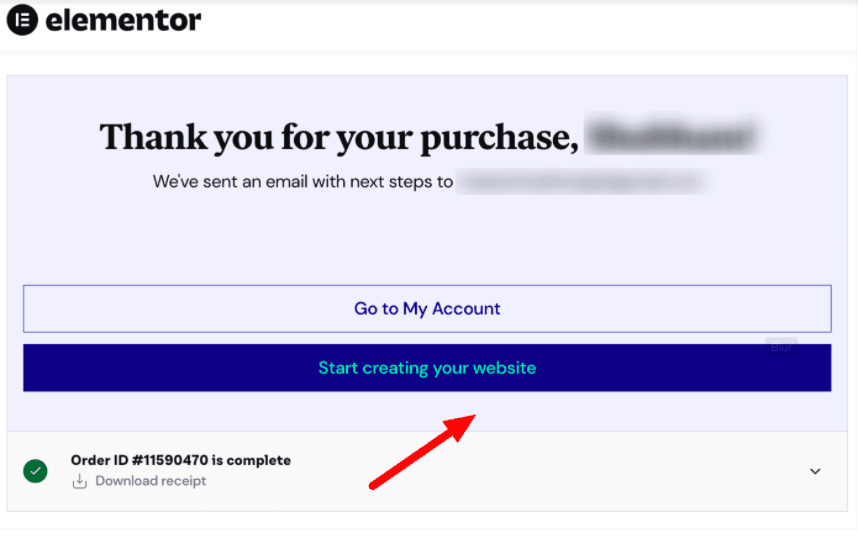
Step #4: Order Confirmation
You will receive the order confirmation with the next step of instructions. What’s more, you can enter your domain name here. Yes, Elementor also offers a subdomain called — example@elementor.cloud. Enter the domain and proceed.
Step #5: “Start Creating Your Website”
Now you need to click on Start Creating Your Website.”
You will be redirected to the dashboard of Elementor, where you get to see your Elementor-hosted website.
You will have three different options to choose from:
- Open WP Dashboard
- Edit With Elementor
- Manage This Website
If you wanna check the WordPress dashboard, you could simply get started with the “Open WP Dashboard.”
From there, you can start designing your website with Elementor Pro right away.
So, this is a quick tutorial on how to get started with the Elementor Cloud Website.
Can You Use Other WordPress Plugins With Elementor Cloud?
Plenty of page builder plugins also offer cloud solutions like Elementor Cloud, but you will not be able to use most WordPress plugins on those cloud solutions. Elementor Cloud does not restrict you from using other WordPress plugins, which means you can install them and pretty much use them with Elementor Pro. However, there are some plugins you might not be able to use with Elementor Cloud.
First & foremost are the other page builder plugins like Divi, Beaver Builder, or Oxygen Builder. You won’t need them anyway because you get everything with Elementor Pro as it is. Here are some other plugins you can use with Elementor Cloud:
- Visual Composer
- WP Clone
- Brizy
- Site Origin Panels
- Shortcodes Ultimate
- BWP Minify
- Peepso
- JetPack
- Backup Guard
- SiteGround Migrator
- Updraft Plus
- VaultPress
Elementor WordPress Hosting Pricing
Elementor has restructured its WordPress hosting plans to offer more flexibility and scalability. They now offer five different hosting tiers under their “Auto-Scaling Hosting” category, each designed to meet different website needs and traffic requirements.

1. Host Cloud Plan: Starting at $8.99/month, this entry-level plan is perfect for beginners who want to create their first WordPress website. You get 1 website with 10GB SSD storage, 10GB monthly bandwidth, and automatic daily backups for 7 days. The plan includes unlimited monthly visits, free domain connection, auto-scaling capabilities, and CloudFlare Enterprise CDN.
2. Host Cloud+ Plan: Priced at $14.99/month, this plan offers enhanced features for growing websites. You still get 1 website but with increased resources – 20GB SSD storage, 20GB monthly bandwidth, and extended 14-day automatic daily backups. Like the basic plan, it includes unlimited monthly visits, free domain, auto-scaling, and CloudFlare Enterprise CDN.
3. Host Cloud X3 Plan: At $24.99/month, this plan is designed for users managing multiple websites. You can host up to 3 websites with 40GB SSD storage, 30GB monthly bandwidth, and 30-day automatic daily backups. The plan includes unlimited monthly visits and all the premium features like auto-scaling and CloudFlare Enterprise CDN.
4. Host Cloud X10 Plan: This robust plan costs $59.99/month and allows you to host up to 10 websites. You get substantial resources with 100GB SSD storage, 50GB monthly bandwidth, and 60-day automatic daily backups. Perfect for agencies or businesses managing multiple client websites.
5. Host Cloud X25 Plan: The most comprehensive plan at $119.99/month, designed for large-scale operations. You can host up to 25 websites with 250GB SSD storage, 150GB monthly bandwidth, and 60-day automatic daily backups. This plan is ideal for agencies, developers, or businesses with extensive web presence needs.
All plans come with essential features, including unlimited monthly visits, free domain connection, auto-scaling hosting, CloudFlare Enterprise CDN, on-demand backups, page caching, and file manager & SFTP access. The higher-tier plans (X3, X10, and X25) also include additional features like staging environments and site cloning capabilities.
Unfortunately, there’s no free plan or free trial available for Elementor Cloud hosting plans. However, they offer a no-strings-attached 30-day money-back guarantee on all plans.
Important Note: These plans focus on hosting services, with Elementor Pro Builder sold separately. This gives you the flexibility to choose hosting that matches your needs without being locked into a specific page builder package.
Is there any value you get after paying for Elementor WordPress hosting?
Absolutely, yes! Let me back up my claim. You’re getting Elementor Cloud hosting, which includes premium support, custom domain connection, free SSL, free CDN, daily backups, WordPress pre-installed, and all Elementor Pro features.
Even the Elementor Pro single website license costs $60 yearly. Now you see what kind of value you’re getting with the Elementor Cloud Website. If you don’t know, Elementor Pro is one of the best WordPress page builders available out there.
If you’re like me, avoiding the technical hosting hassle, don’t hold back — try Elementor Cloud today.
What’s more, Elementor Cloud also comes with a thirty-day money-back Guarantee. Somehow, if you don’t like the services of Elementor Cloud, you could raise a refund request.
Related Read:
Conclusion: Elementor has changed its Cloud Plan to WordPress Hosting Plans
So this is my detailed Elementor Cloud review. I hope this helped you get detailed insights into what Elementor Cloud is and what it does.
Before making any conclusion, I’m excited to try it out and check the technical performance — uptime, server performance, and speed testing. Maybe in a couple of weeks, after thoroughly testing Elementor Cloud Website, I’ll drop more in-depth insights.
What are you waiting for? Get a subscription to the Elementor Cloud Website now.
I would like to hear from you — share your thoughts in the comments section below.
FAQs On Elementor Cloud Website
You need to have an Elementor Cloud Website subscription to create a website. However, you can install the Elementor plugin for free on your website.
Elementor Cloud Website is a great option for those creators who want to create a website but don’t want to rely on third-party hosting providers to host their websites.
You don’t need a custom domain to create an Elementor Cloud Website because they provide you with an elementor.cloud domain for free with the subscription. However, if you already have a custom domain, then you can simply connect it to your Elementor Cloud Website.
You can create only one website with the Elementor Cloud Website. If you want to create multiple Elementor Cloud websites, then you will need multiple subscriptions for it.
If you don’t want to use the hosting of the Elementor Cloud Website and want to switch to an Elementor Plugin plan, then you need to inform their support team within 30 days, and they will make the switch for you.
