
I have been using Semrush for over 8 years now, and it is part of my daily SEO workflow. Half of the tools never existed when I started with it.
In that time, I have tested practically every feature it offers for competitor research. And one thing I learned is that Semrush is not a one-click competitive analysis tool. Well, there is no tool on the internet that gives you a full report on your competitors. Things don’t work like that either.
What Semrush does is give you a set of individual tools, each built for a specific part of competitor research. Most of the tools are linked to each other, so it is less hassle to create a complete picture through a report. This way, you can easily know what your competitors are doing and where you can beat them.
Let’s look at how we use Semrush for competitor analysis at DemandSage and how you can keep yourself one step ahead of your competitors.
Key Takeaways
- Semrush offers multiple competitive analysis tools, each for a different angle (keywords, traffic, backlinks, advertising, AI visibility, and more)
- Find all your organic competitors under Domain Overview or Organic Rankings.
- Not all competitors are the same. Analyzing them on the same metrics is just a waste of time.
- The Keyword Gap tool finds you the relevant keywords that your competitors rank for, and you don’t.
- With Backlink Gap, you can find outreach prospects from your competitors to build quality backlinks.
- AI Visibility toolkit tracks your competitors’ AI search rankings and the gaps where your site is missing opportunities.
- Semrush One plan includes almost all the tools you need for ground-level competitive analysis. Add-ons need to be purchased for deeper analysis.
- You can start with free Semrush competitive tools before committing a paid plan.
- A 14-day exclusive free trial is available for new users on Semrush One and SEO Classic plans.
Affiliate Disclosure: When you purchase through links on our website, we may earn an affiliate commission at no extra cost to you.
Semrush Competitor Analysis Tools
Before I start with the competitive analysis, here are the 9 Semrush tools I am going to use:
- Domain Overview
- Organic Rankings
- Keyword Gap
- Backlink Gap
- Advertising Research
- Traffic Analytics
- AI Visibility
- Position Tracking
- Competitor Monitoring
FYI: Not all these tools are available on every plan. I will mention which ones need a separate subscription as we move forward.
How to Find Competitors in Semrush?
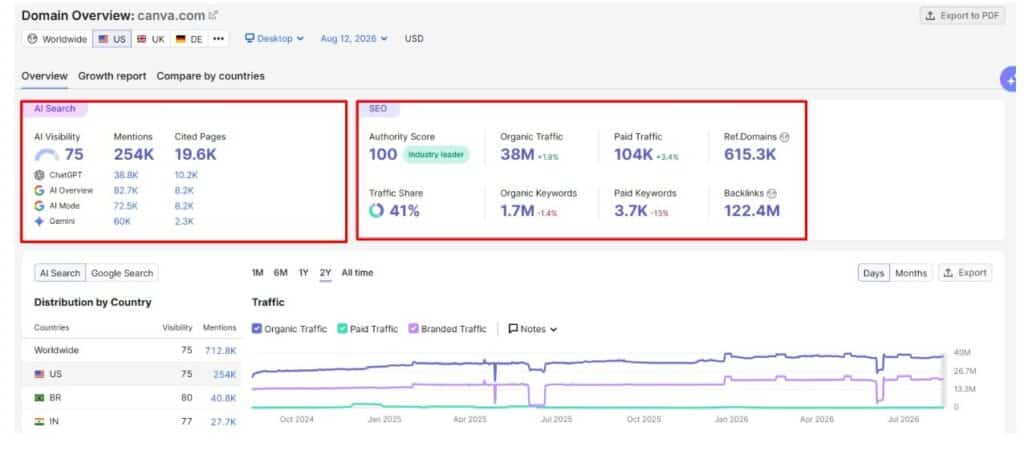
When you open Domain Overview and enter your website’s URL (or any), you can see your overall SEO metrics and AI Search visibility (if you are on the Semrush One plan). Make sure to select the target country if your research is region-specific.
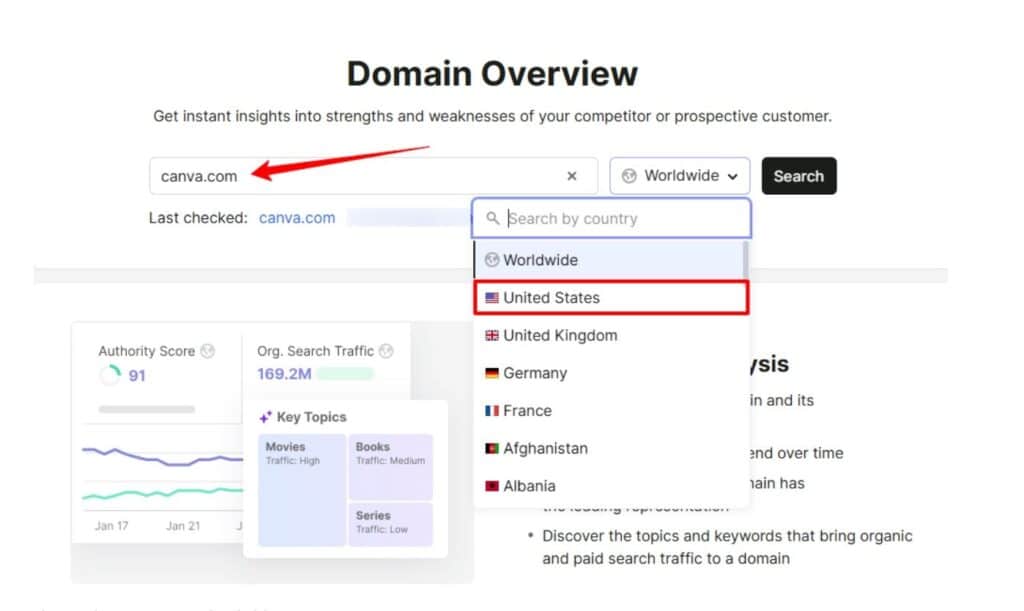
This is how metrics look like:
When you scroll a little bit, you will find a list of main organic competitors. Semrush lists these competitors after tracking millions of search engine results and websites that compete for the same keyword as your site.
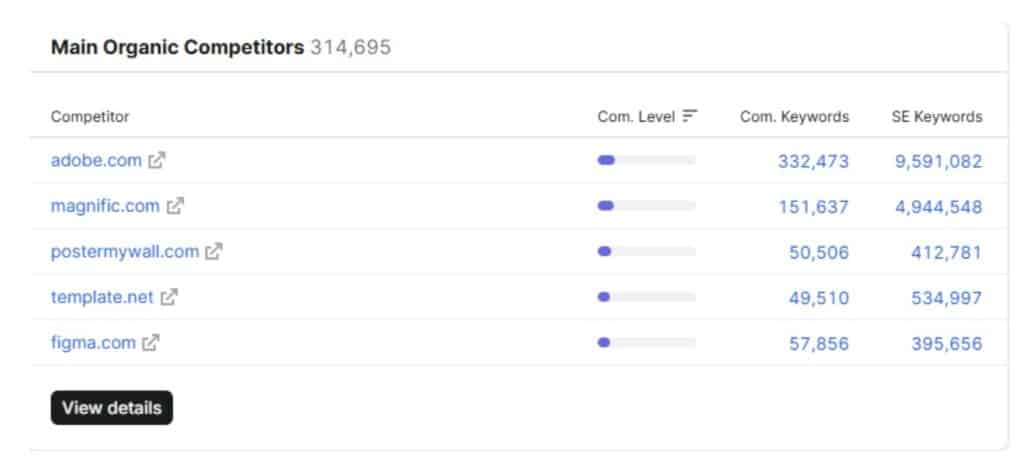
These competitors (of Canva) count as both business and SERP competitors. Because whether you search specifically by product name (e.g., graphic design tool) or related queries, you might find Canva and its competitors in the SERP.
But this doesn’t happen with all the sites. Business and SERP competitors can be completely different
Difference Between Business Competitors and SERP Competitors
Business competitors are direct competitors, those who sell or provide similar services. They target the same audience; they should be your top priority, as you are going to compare on similar ground.
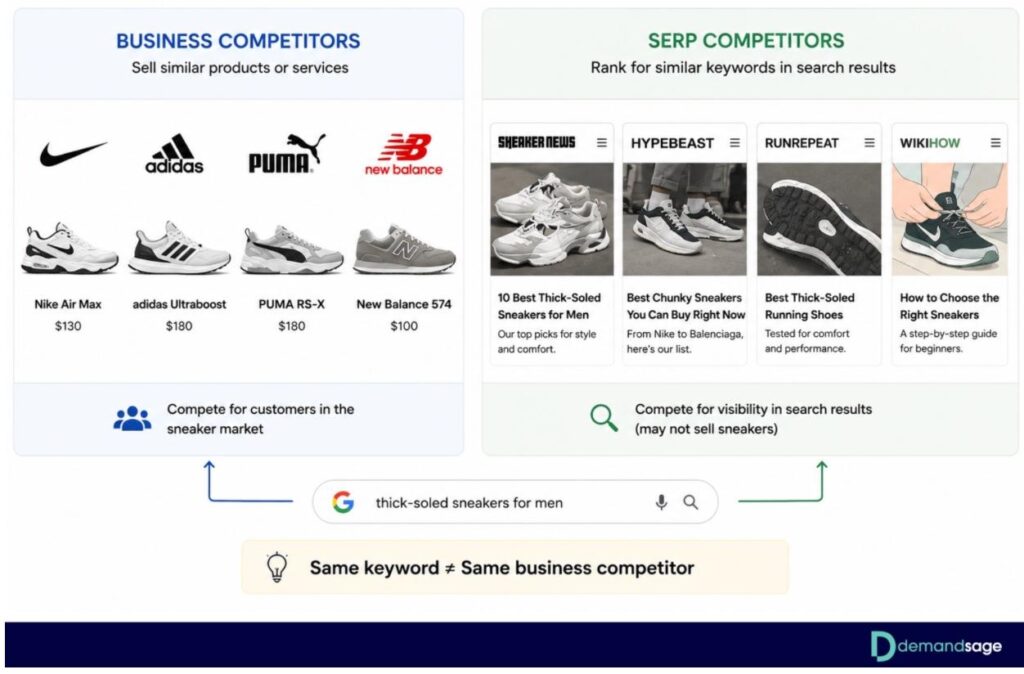
SERP competitors are websites that rank for your target keywords or overlapping keywords as your site. They might compete with you for organic search and traffic, even if they don’t necessarily offer similar services.
| Differences | Business/Direct Competitors | SERP/Indirect Competitors |
|---|---|---|
| How to Identify | Offer similar products or services | Rank for similar keywords as yours |
| Where they compete | Product or service market | Search engine results |
| Must they offer a similar product | Generally Yes | No |
| Overlapping | May or may not rank for the same keyword | May or may not sell a similar product |
| Example (Sneakers, Shoes niche) | Nike, Adidas, Puma, New Balance | Sneaker News, Hypebeast, RunRepeat |
Why do you need to know the difference?
Not all of your rivals compete or target the same audience. So you don’t need to audit all of them on the same metrics. If you sell sneakers via a website and one competitor reviews sneakers online, you both might rank for “thick-soled sneakers for men”. But you can’t consider it a direct competitor, as the other website doesn’t sell any sneakers.
So my point is: same keyword ≠ same business competitor
When you do your competitor analysis, focus the strategies and metrics on your actual business competitors. The SERP competitors are definitely useful for content strategy and keyword ideas. But it is pointless to waste hours analyzing their pricing or product strategy when they are in a completely different business.
Analyze Competitors’ Organic Search Data
Now moving to organic research with Semrush Organic Rankings. Redirect to this page by clicking View Details under Main Organic Competitors or by navigating SEO > Competitive Analysis > Organic Rankings > Competitors.
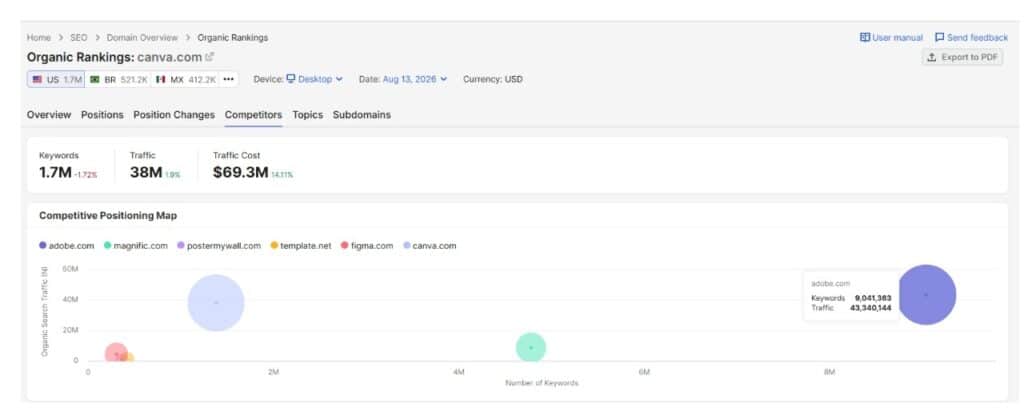
At the upper fold, you can see a competitive positioning map with the number of keywords, traffic, and traffic cost.
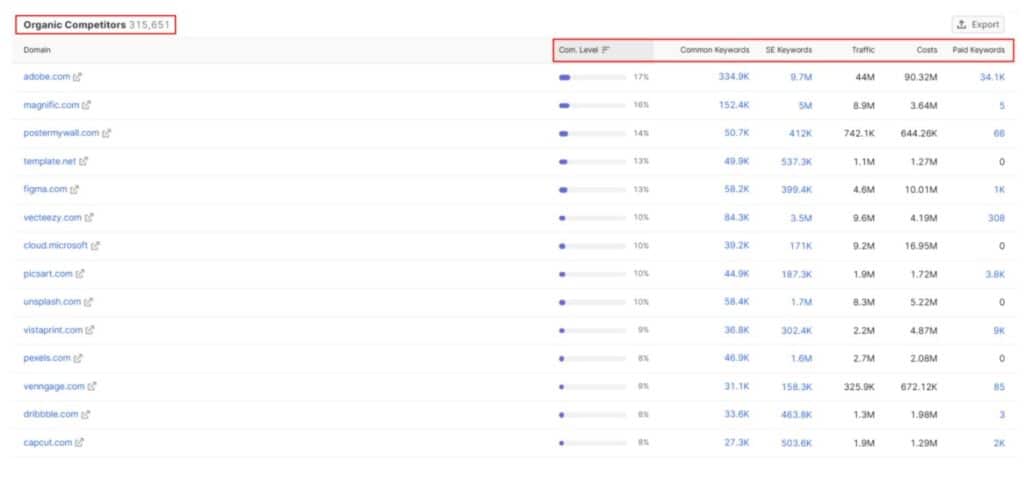
But when you scroll down, you will see all of your organic competitors with:
- Competition Level
- Common Keywords
- Search Engine Keywords
- Traffic
- Costs
- Paid Keywords
You can export this list in Excel or CSV format (first 100 to 3,000 or all of them based on your subscription)
How to Check A Competitor’s Top Keywords with Organic Rankings
Go to SEO > Competitive Research > Organic Rankings. Enter a competitor’s domain and hit search.
Semrush will show you every keyword that domain ranks for in organic search. You get their position, the estimated traffic each keyword drives, the keyword difficulty, and the search volume.
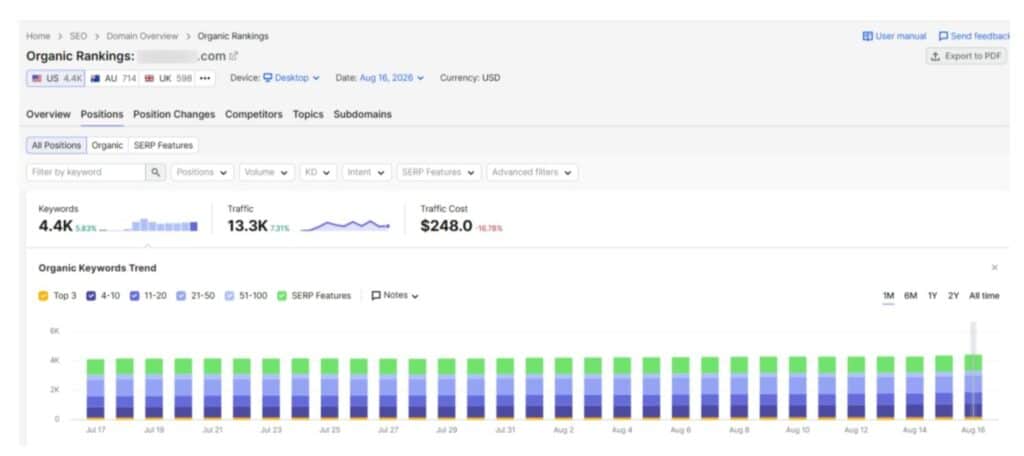
This is your shortcut to finding proven keywords. If a competitor ranks for a term, it means Google considers that topic relevant to your industry. The question is whether you can create better content and outrank them.
Sort by traffic to see which keywords drive the most visitors to their site. These are the money keywords. The ones actually bringing people in.
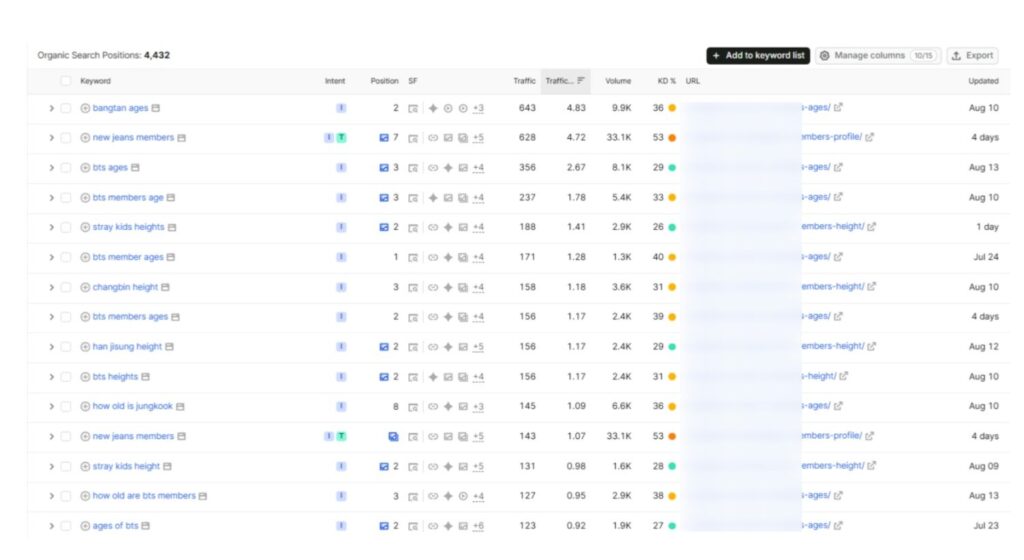
Filter by keyword difficulty (KD) under 30 and volume over 100 to find their low-hanging keywords. These are the easiest ones to target first, especially if you are a newer site with lower authority.
Semrush Keyword Gap Tool: Find Keyword Gaps Between You and Competitors
Semrush’s Keyword Gap tool does exactly what the name says. It finds the gap between your keyword profile and your competitors’.
Open Keyword Gap under Competitive Research. Enter your domain in the first field and up to 4 competitor domains in the other fields.
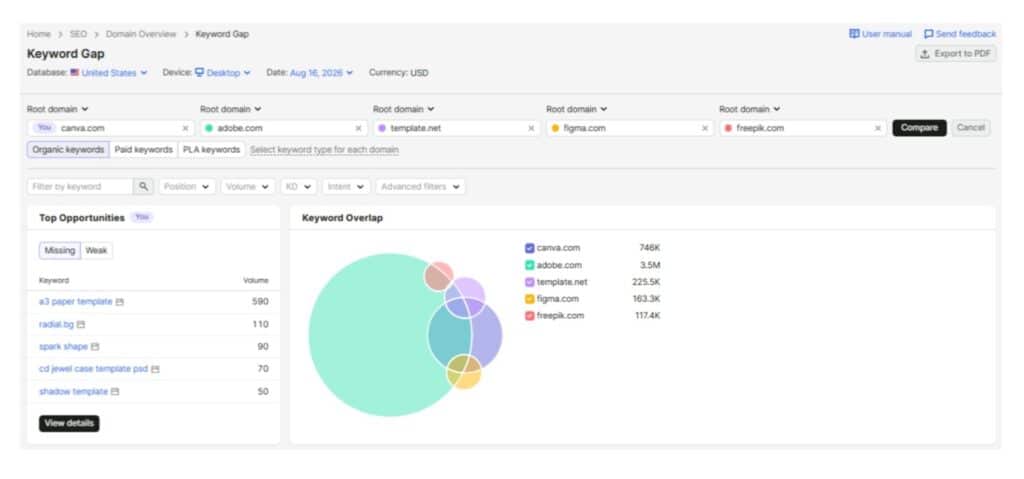
Hit Compare. Semrush will generate a massive comparison showing all the keywords across these domains. But the real value is in the filter tabs at the top.
Identifying Missing, Weak, and Potential Keywords for Your Website
There are several tabs, but these three matter the most:
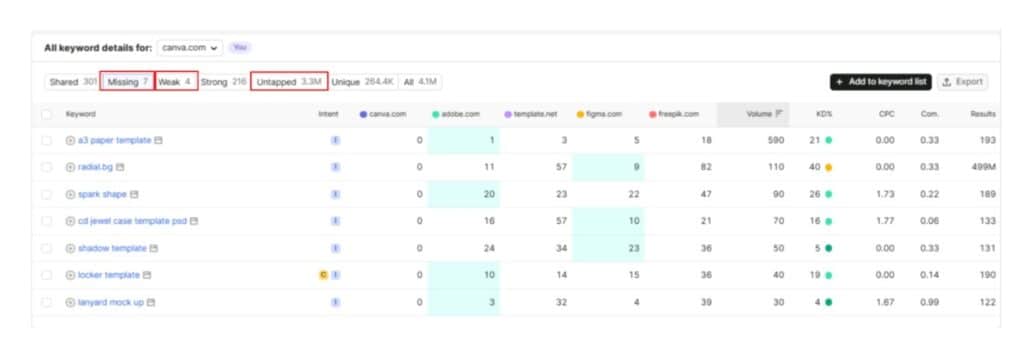
- Missing: These are keywords that ALL of your competitors rank for, but you don’t rank for at all. If multiple competitors are ranking for a keyword and you are completely absent, that is a gap you need to fill. These are your biggest missed opportunities.
- Weak: These are keywords where you do rank, but your competitors outrank you. Maybe you are on page 3, and they are on page 1. These are the keywords where you have existing content, but it needs improvement.
- Untapped: Keywords where at least one of your competitors ranks, but you don’t. Different from “Missing” because not all competitors rank here, just some.
Here is how I use this data:
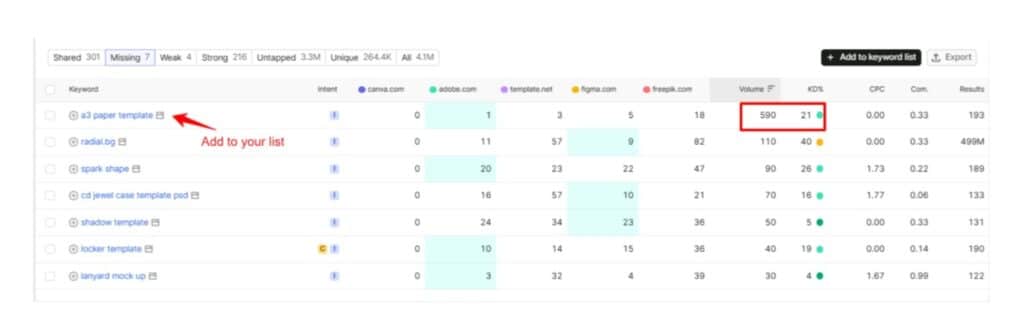
First, go to the Missing tab and sort the list by search volume. Look for keywords with decent search volume (500+) and a reasonable keyword difficulty (under 40 if possible). These keywords should be your priority topics.
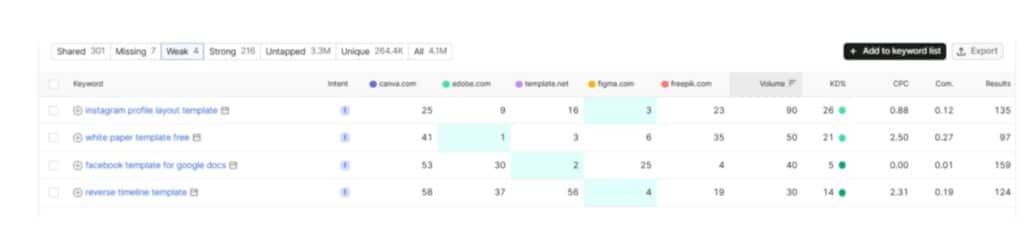
Then check the Weak tab. If you already have content ranking for a keyword but it sits on page 2 or 3, sometimes all it needs is a content refresh. Update the information, add more depth, and fix on-page SEO. This is often faster than creating something new from scratch.
After finding keywords through Keyword Gap, don’t just blindly create content for every keyword. Ask yourself: does this keyword match my audience’s intent? Does it make sense for my business?
A keyword with 10,000 monthly searches is useless if the people searching for it will never buy your product.
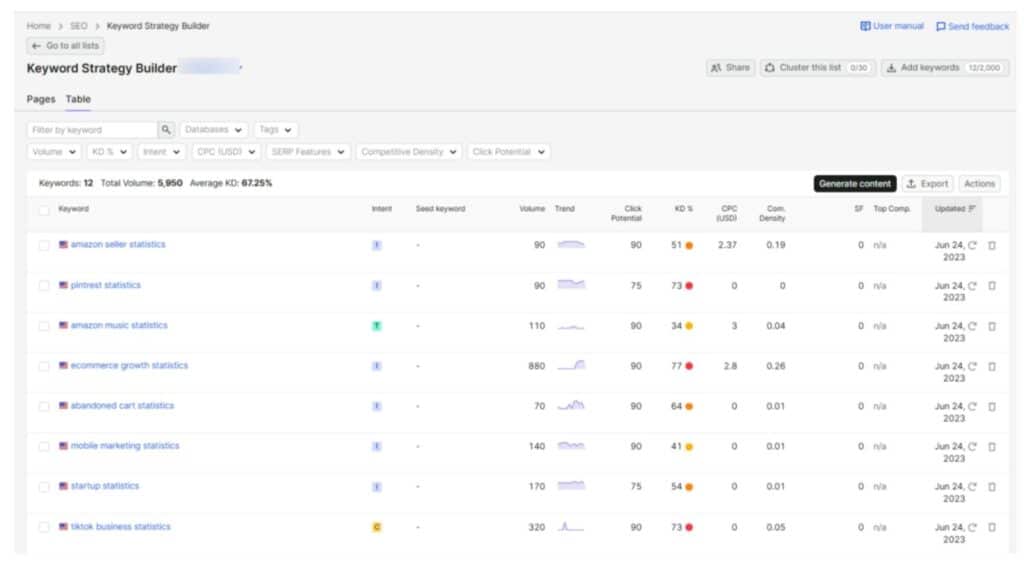
You can export the entire keyword gap data to CSV or send it directly to the Keyword Strategy Builder inside Semrush. The Strategy Builder groups related keywords into clusters, which helps you plan content around topics using these keywords.
Semrush Backlink Analysis (Backlink Gap)
This is the fastest route to build quality backlinks for your site. All you need to know sources from which your competitors are getting links.
Go to SEO > Competitive Research > Backlink Gap. Enter your domain and up to 4 competitors.
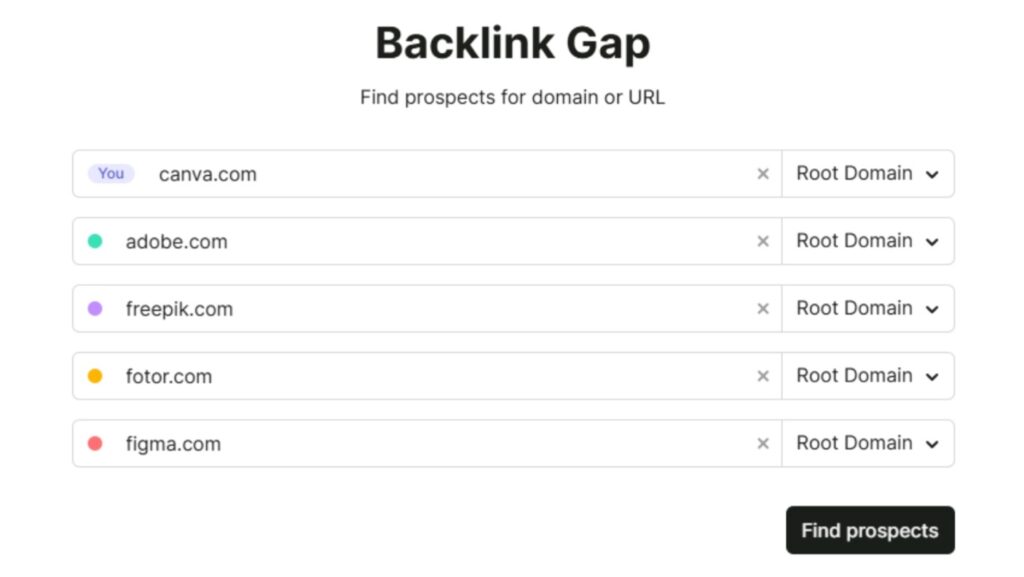
Semrush will show you a comparison of all referring domains across these websites. You get a graph at the top showing backlink trends over time and a table below with the actual domains.
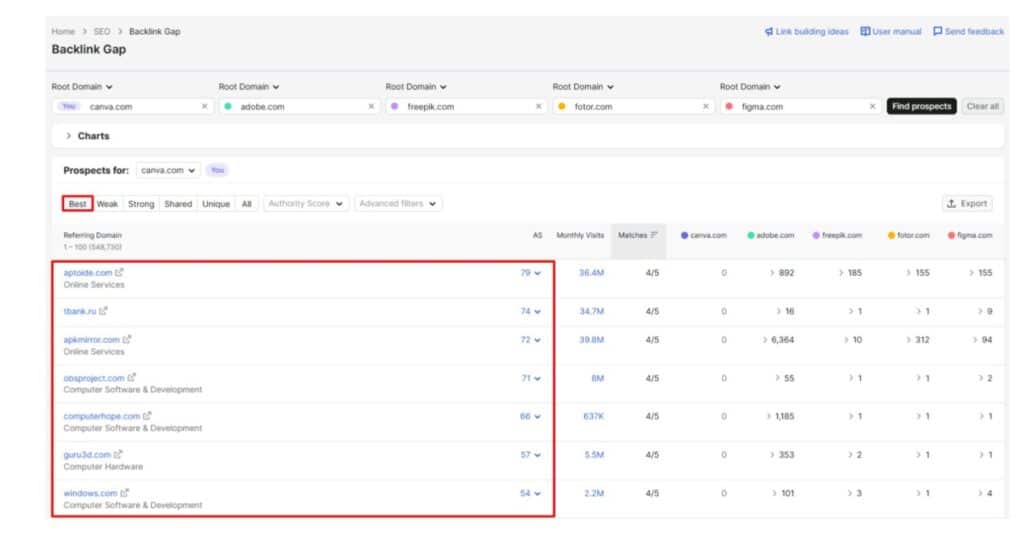
The magic filter here is called “Best“. Click it. This shows you domains that link to ALL of your competitors but not to you. These are your highest priority link building prospects. If a website links to three or four of your competitors, there is a good chance they will link to you too if you approach them with relevant content.
How to Analyze a Competitor’s Backlink Profile
For each referring domain, look at the Authority Score. Higher authority domains pass more SEO value. Sort by Authority Score to focus on the most impactful link opportunities first.
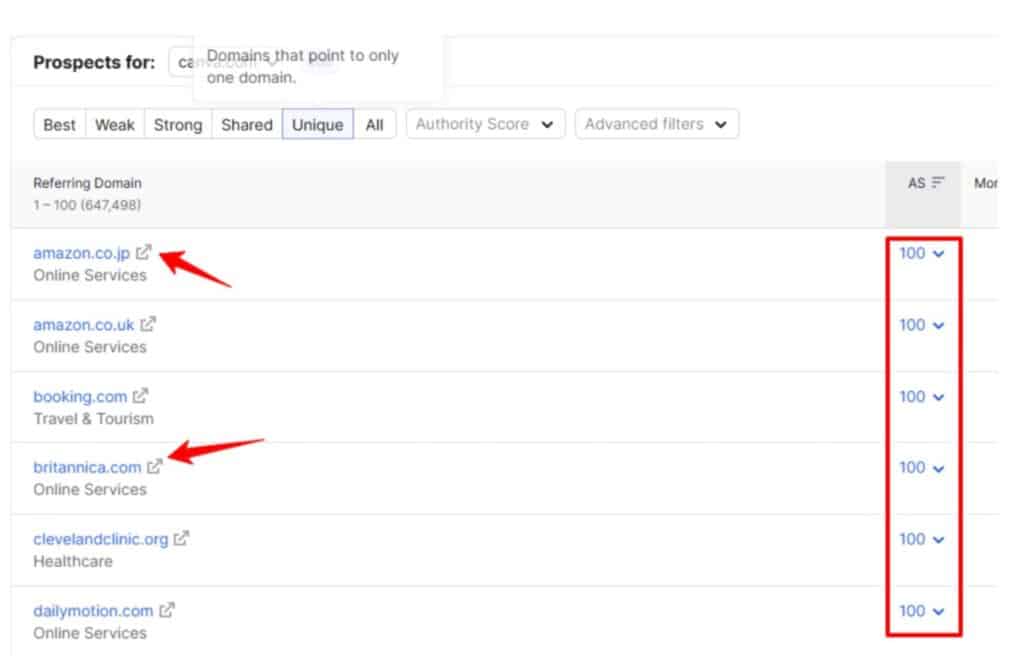
Click the arrow next to any competitor’s column to see the specific pages being linked to and the anchor text being used. This tells you what kind of content attracts links in your niche.
What to do with This Backlink Data?
Don’t just collect backlink data and move on. Here is what you actually do with it:
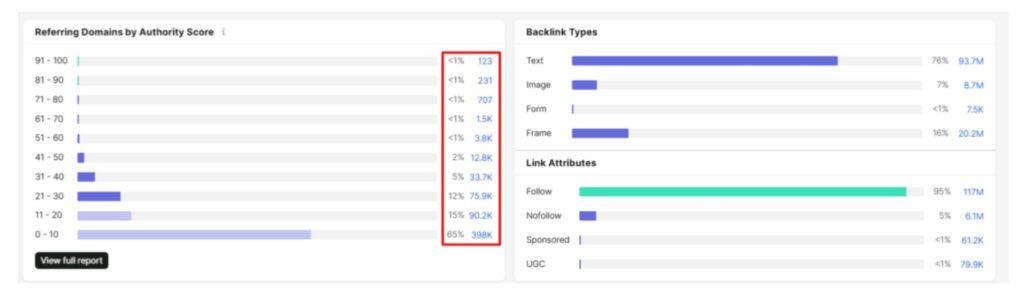
- Replicate competitor links: If a competitor got a link from a specific website because they wrote a guest post or were featured in a roundup, you can reach out to that same website with your own pitch.
- Find broken link opportunities: Sometimes competitors have pages that no longer exist but still have backlinks pointing to them. If you can create a similar resource, you can reach out to those linking sites and suggest they update the link to point to your page instead.
- Spot content formats that attract links: If you notice that competitor pages with original data, case studies, or free tools get the most backlinks, that tells you what to create.
- Prioritize quality over quantity: One backlink from a high-authority site in your industry is worth more than 50 links from random directories. Focus your outreach on domains with an Authority Score above 40 and genuine relevance to your niche.
Semrush Advertising Research to Spy on Competitors’ Paid Ads
Now we move to paid search territory. Advertising Research is a part of the Semrush Advertising toolkit, which is a separate subscription from the standard SEO plans. It is not included with Semrush One or the SEO Classic plans by default.
But once you have access, it is extremely valuable.
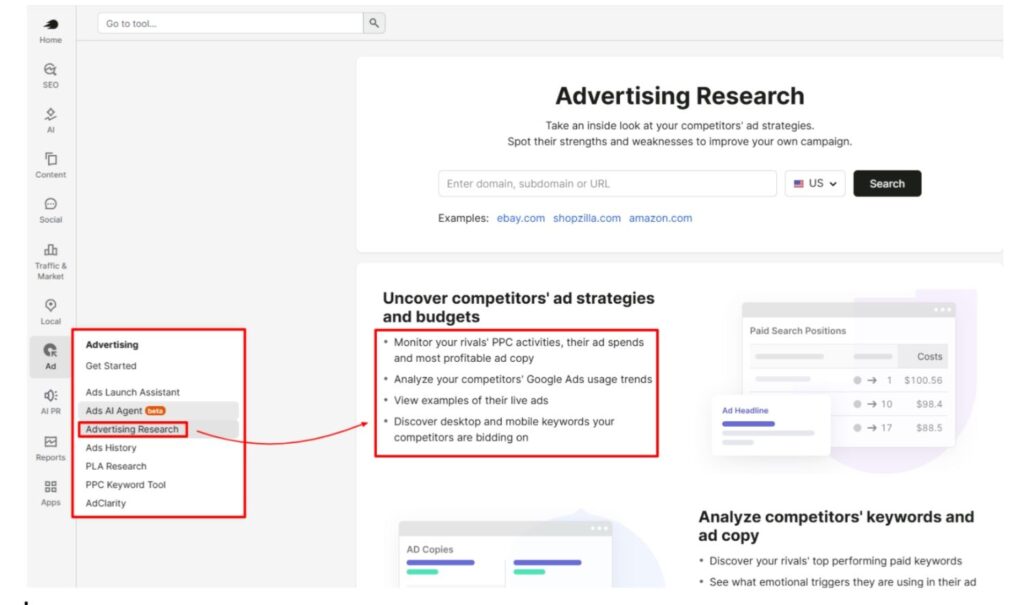
Enter your competitor’s domain in the Advertising Research tool, and you will see:
- Paid Keywords: Every keyword the competitor is bidding on through Google Ads
- Ad Copies: The actual text ads they are running (headlines, descriptions, display URLs)
- Ad History: Historical advertisement strategies dating back to 2012.
- Landing Pages: Pages that drive paid traffic (source pages)
- Paid Competitors: Other domains and competitors that are bidding on similar keywords
The Ad Copies tab is where I spend the most time. You can see the exact ad headlines and descriptions competitors use. Pay attention to what they highlight.
- Are they leading with price?
- Free trials?
- Specific features?
- Urgency (“limited time offer”)?
This tells you what messaging resonates in your market.
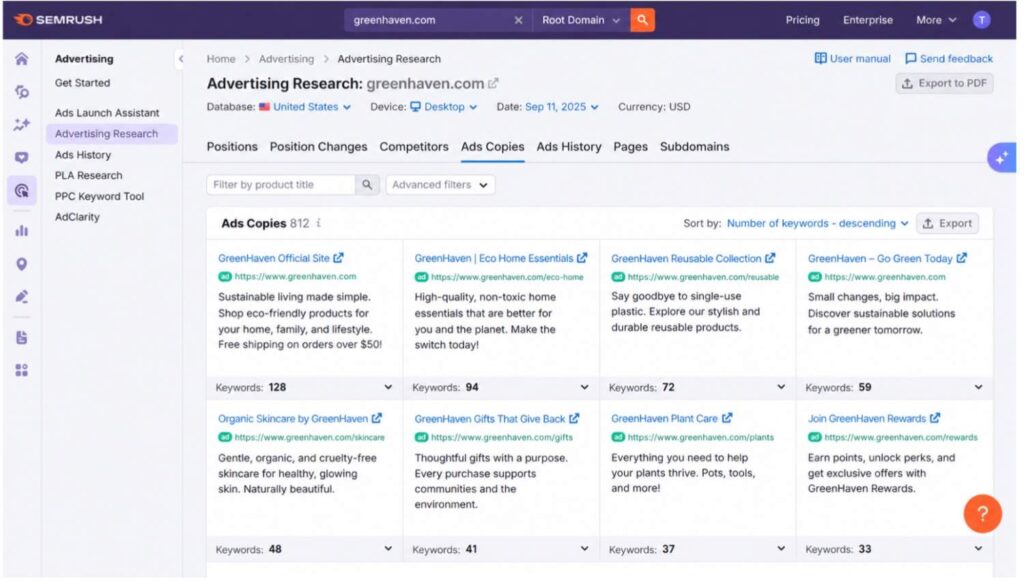
The Ad History section is underrated. It shows you what ad copies a competitor has tested and abandoned versus what they have kept running for months. If an ad has been running consistently for 6+ months, it is probably working. If they tested an ad for 2 weeks and pulled it, it probably wasn’t converting.
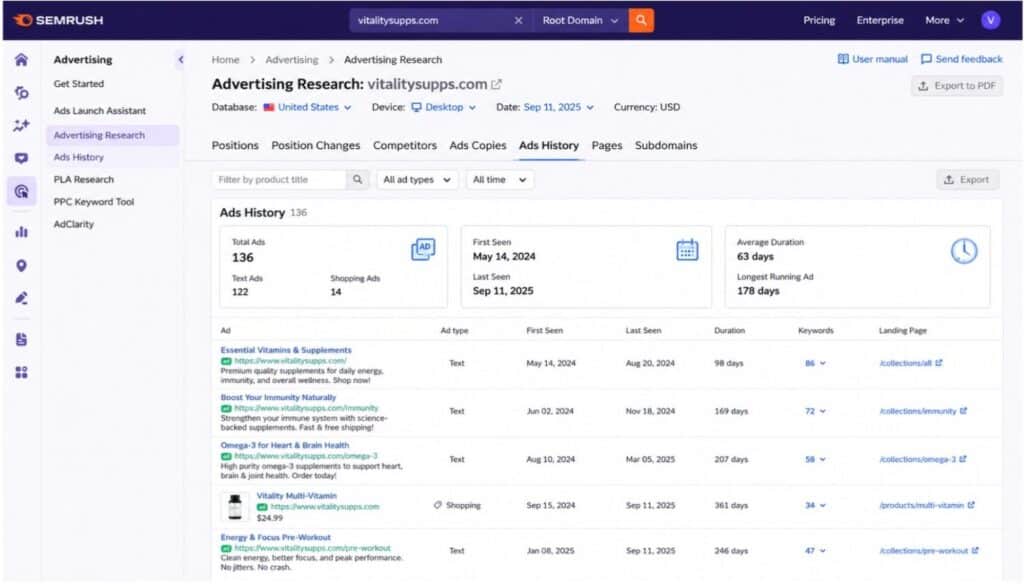
You can also compare paid keywords with organic keywords to find interesting overlaps. If a competitor is paying for a keyword that they also rank for organically, that keyword is likely extremely valuable to their business. They are willing to pay for clicks even when they get free organic traffic for it.
Semrush AI Toolkit — Compare AI Search Visibility
This is the newest addition to Semrush’s toolkit and honestly one of the most important one since AI search became a thing. With ChatGPT, Gemini, Perplexity, and Google AI Overviews influencing how people discover brands, you need to know where your competitors show up in AI answers and where you don’t.
The AI Visibility Toolkit is included with Semrush One plans. It is not available on all Semrush SEO Classic plans unless you purchase it separately.
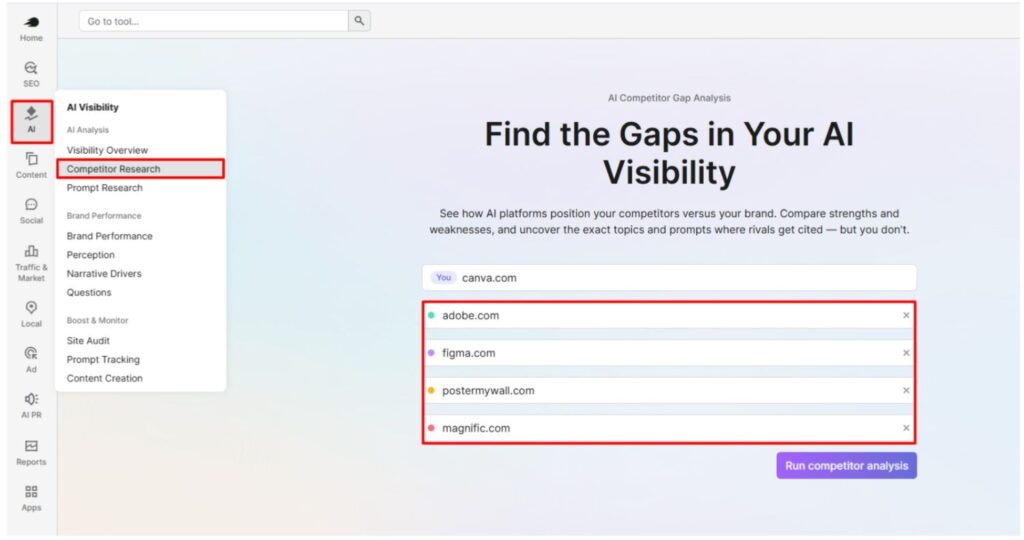
Go to AI Visibility Toolkit > Competitor Research. Enter your domain, and add up to 4 competitor domains, and run the analysis.
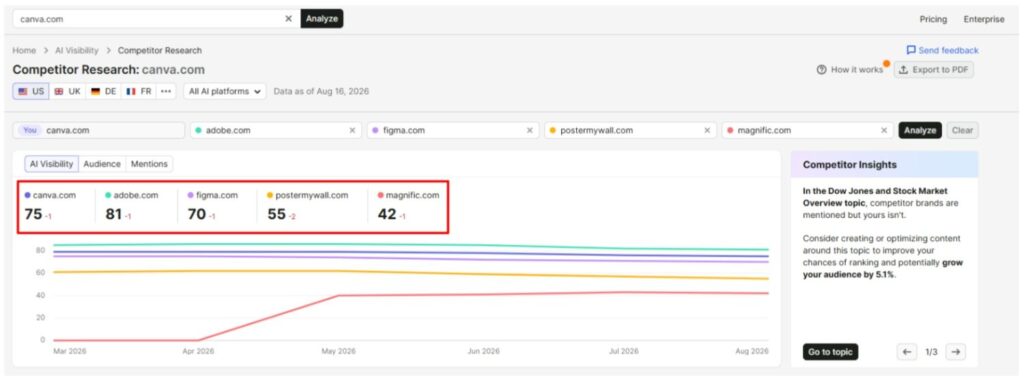
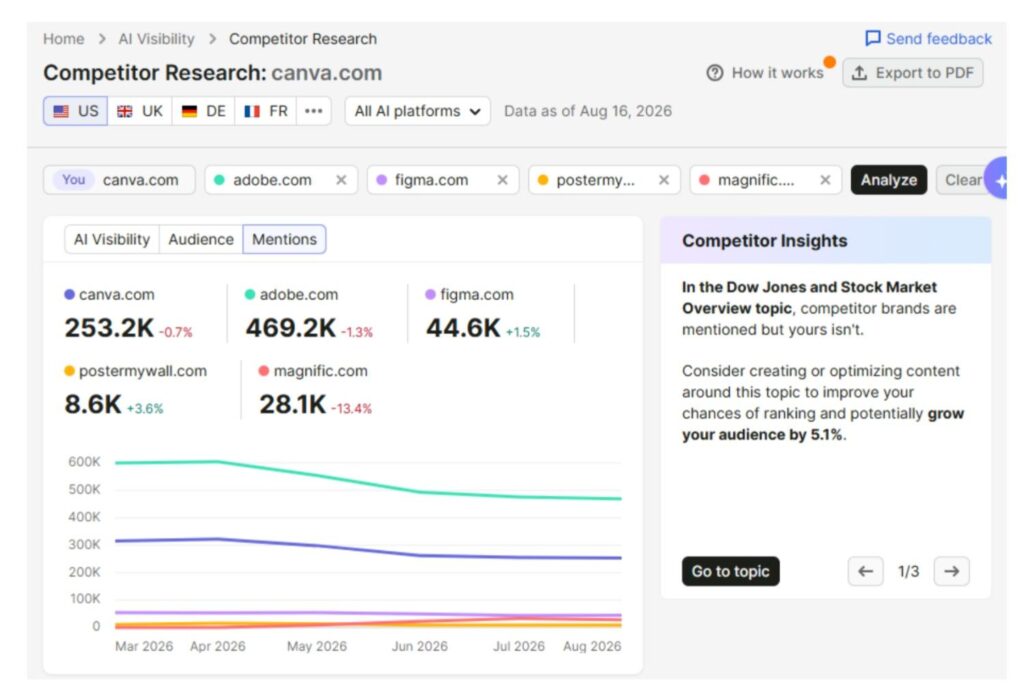
Semrush will compare:
- AI Visibility Score: An overall score (out of 100) showing how visible each domain is across AI platforms
- Mentions: How often each brand gets mentioned in AI-generated answers
- Citations: How often AI platforms actually cite (link to) each domain
- Distribution across LLMs: Which AI platforms mention each brand most (ChatGPT, Gemini, Google AI Mode, etc.)
Switch to the Topics & Prompts tab and click on Missing. This is where it gets really useful. It shows you the prompts and topics where your competitors are getting mentioned by AI platforms, but you are not.
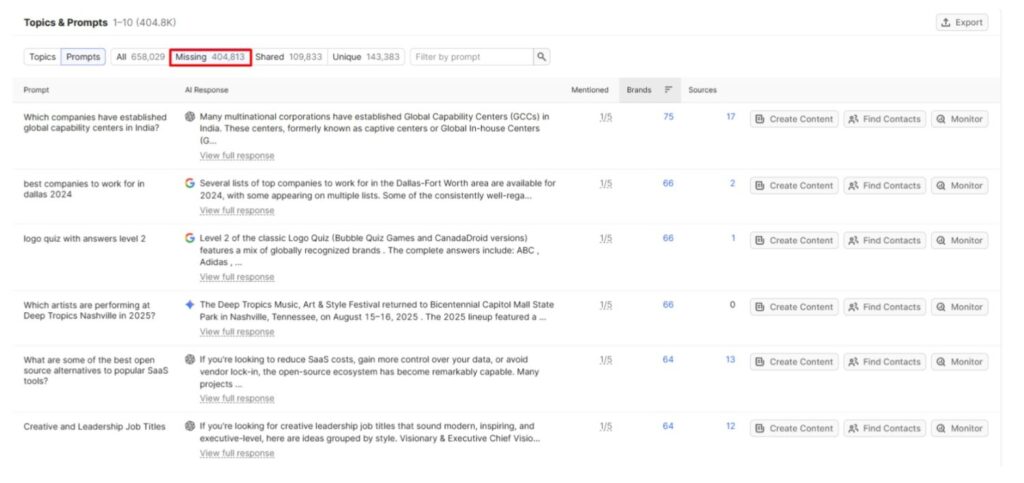
For example, if your competitor gets cited when someone asks ChatGPT “best SEO tools for small businesses,” and you don’t show up at all, that is a visibility gap you need to close.
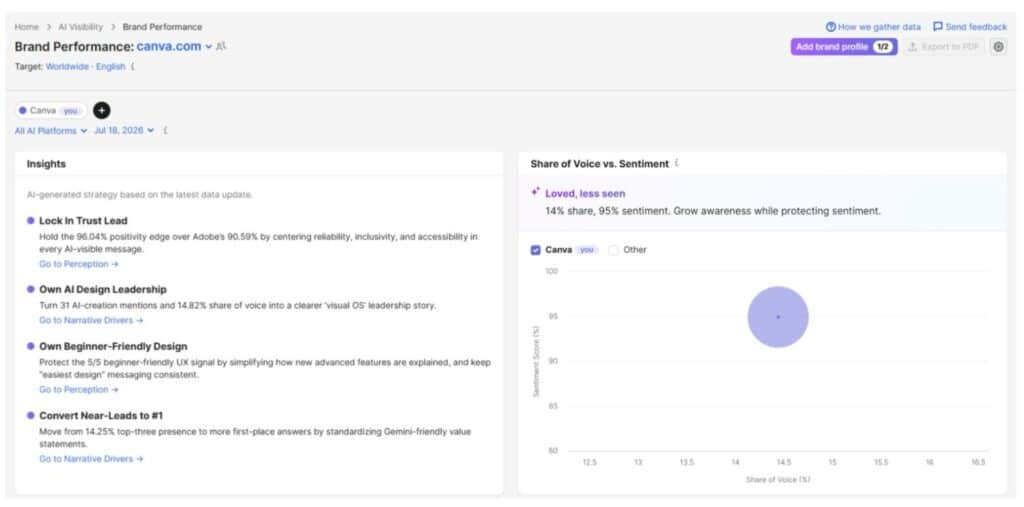
You can also use the Brand Performance section to see the sentiment AI platforms associate with your brand compared to competitors. Are AI platforms talking about you positively? Negatively or Neutrally? This matters because the way AI describes your brand directly influences how users perceive you.
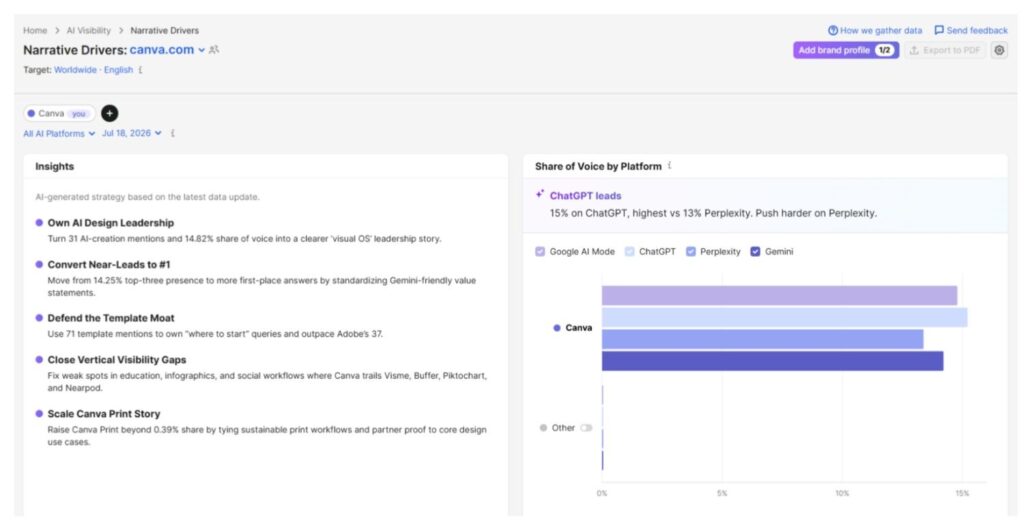
One more thing. Check the Narrative Drivers report to see which domains are most frequently cited by AI platforms in your industry. If Reddit, Wikipedia, and a specific industry blog are the top cited sources, that tells you exactly where to build your off-site presence to improve AI visibility.
Learn more about Semrush One and how it works in our in-depth Semrush One review.
How to Estimate Competitors’ Traffic & Sources
Traffic Analytics is another paid toolkit. It is part of the Traffic & Market Toolkit, which requires a separate subscription. But it provides something very valuable that organic research alone cannot tell you: where your competitors actually get their traffic from.
Enter your domain along with your top competitors and hit Analyze:
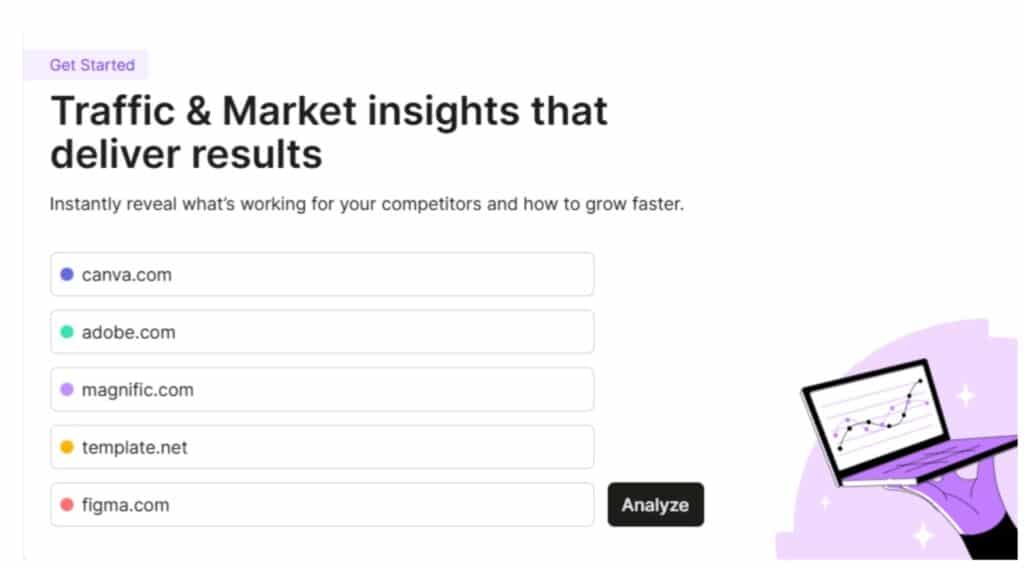
You will see:
- Total visits per month (estimated)
- Unique visitors
- Pages per visit
- Average visit duration
- Bounce rate
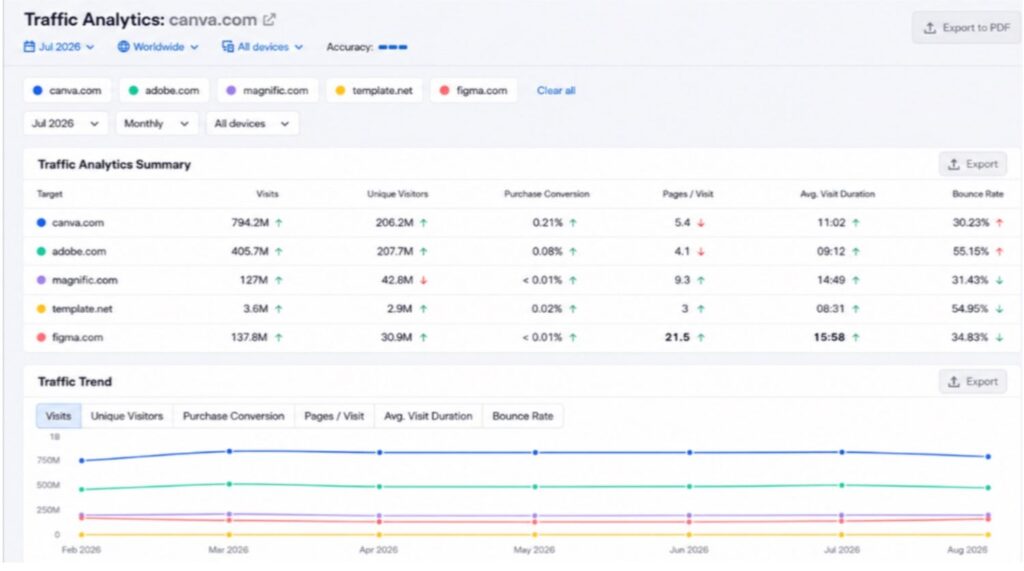
But the real insight is in the Traffic Channel Distribution. This breaks down where the traffic comes from: direct, referral, organic search, paid search, social, and now AI traffic.
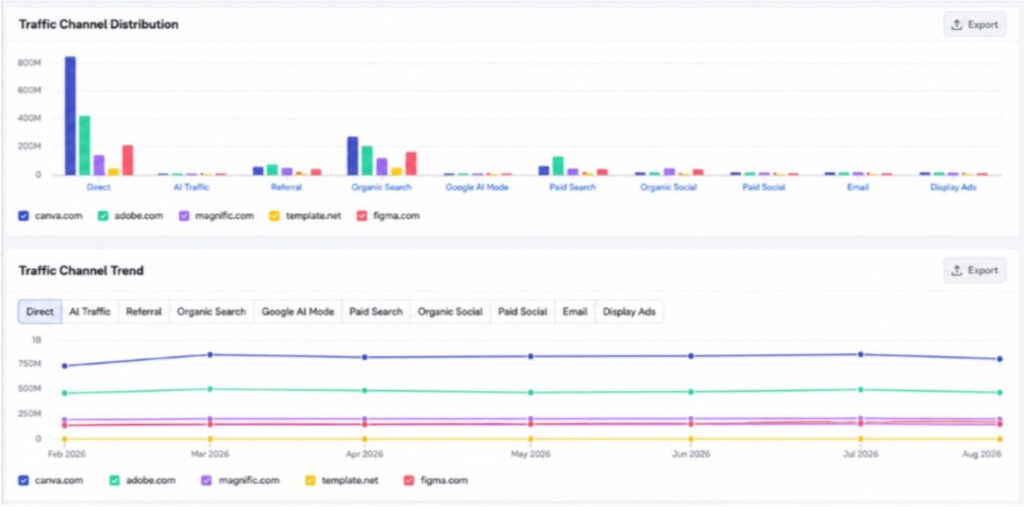
Why do you need to analyze your competitor’s traffic sources?
Here are the situations and what it means:
- If a competitor gets 40% of their traffic from referral sources, they likely have strong partnerships, guest posting programs, or get featured in roundups and listicles on other websites. That is a strategy you can replicate.
- If they edge in paid traffic, they are investing in ads. You can go check their Advertising Research profile to see exactly what they are spending on.
- If organic search drives most of their traffic, then SEO is clearly working for them, and you should dig deeper into their keyword and content strategy.
- And if AI traffic is higher (which is still rare in 2026 but growing), they have likely built strong topical authority and off-site presence that AI platforms trust.
You can also use the Top Pages report to see which individual pages on a competitor’s site get the most traffic and from which channels. If their pricing page gets massive direct traffic, that tells you something about brand awareness. If a blog post gets most traffic from organic search, it tells you about their content strategy.
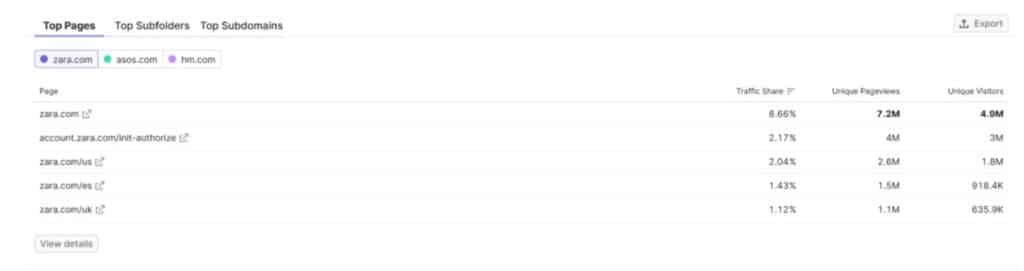
One thing to keep in mind: Traffic Analytics uses estimation models based on clickstream data from a panel of 200M+ internet users. The numbers are directional, not exact. They are very accurate for large sites but can be less reliable for smaller, niche websites.
Monitor Competitors Over Time (Position Tracking + Competitor Monitoring)
Everything I covered above gives you a snapshot. A point-in-time analysis. But your competitors don’t stand still. They publish new content, launch new campaigns, gain and lose keywords every week.
That is where ongoing monitoring comes in.
Setting up Position Tracking
Position Tracking is included with all SEO Classic and Semrush One plans (with keyword limits based on your plan).
You set it up by creating a project for your domain, then adding the keywords you want to track. You can add up to 20 competitor domains to monitor alongside your own.
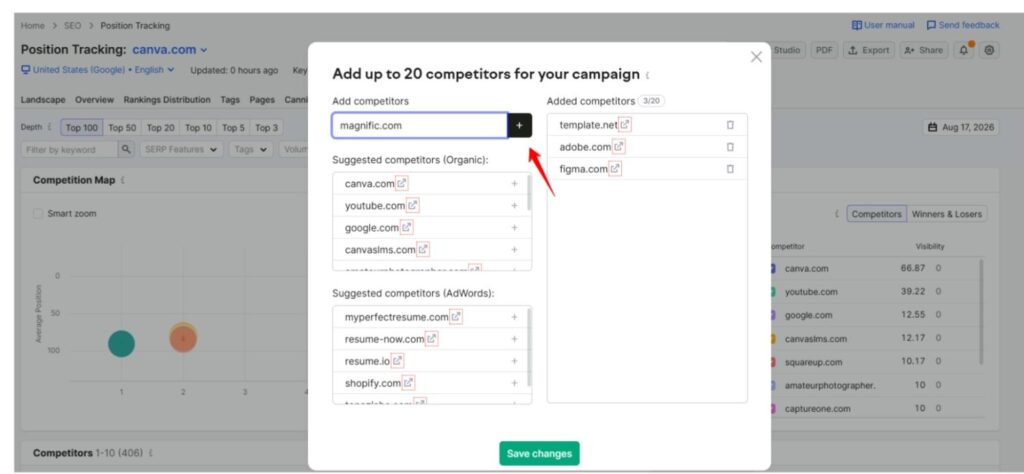
Once it is running, Position Tracking will update your rankings daily. You can see:
- Your position vs. each competitor for every tracked keyword
- Position changes over time (who gained, who dropped)
- Visibility score trends
- Featured snippet ownership
- Which competitor currently ranks #1 for each keyword
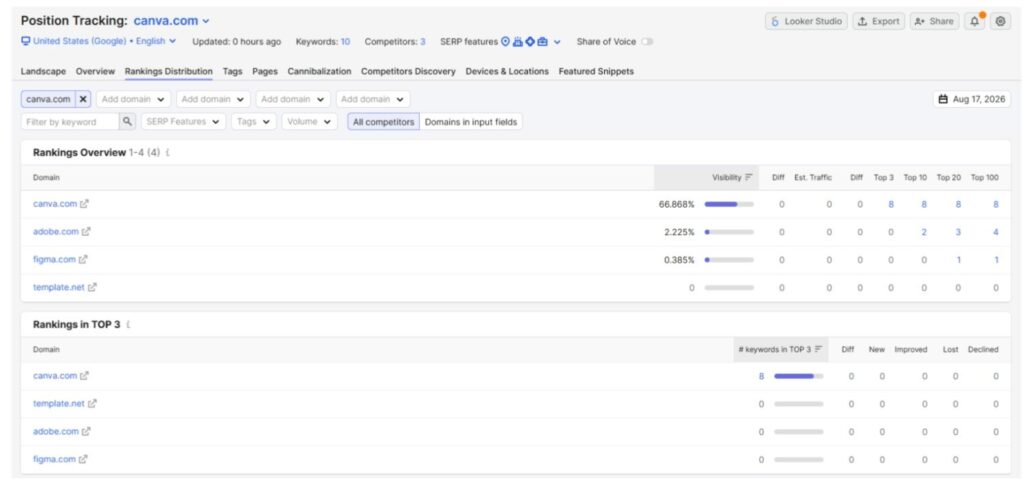
The Competitors Discovery tab inside Position Tracking also surfaces new competitors that are starting to rank for your tracked keywords. This is useful for catching emerging threats before they become serious competition.
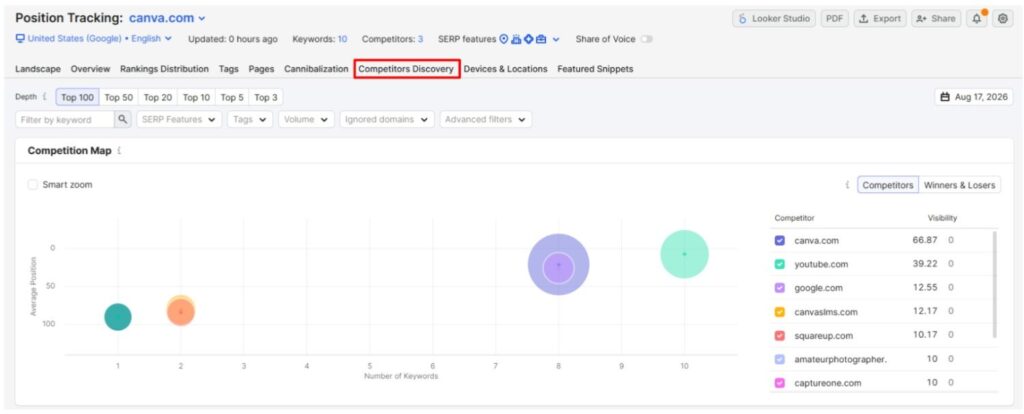
To set it up, go to your project dashboard and click on Set up under Position Tracking (or Create SEO Project if you are starting from scratch). Select your target country, device type (desktop or mobile), and search engine. Then add your target keywords. You can import these from Keyword Gap or add them manually.
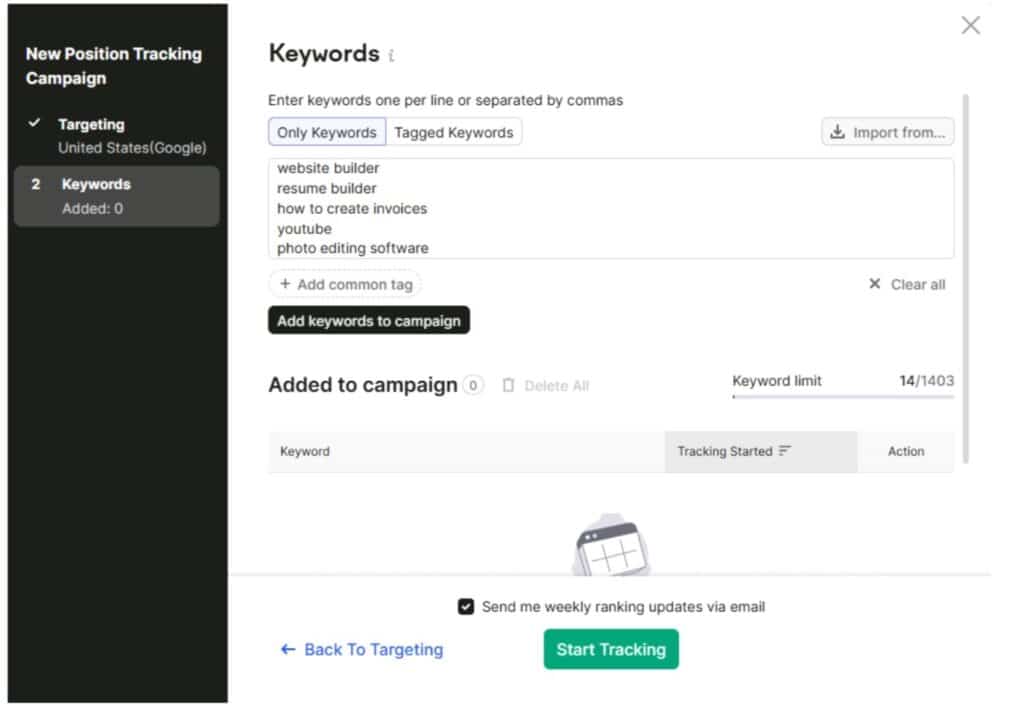
In the next step, add your competitors. You can either enter them manually or use Semrush’s auto-suggested list based on organic and paid keyword overlap.
How to Set Up Automated Competitor Monitoring?
Competitor Monitoring (formerly known as EyeOn) is part of the Traffic & Market Toolkit. It takes a whole different approach from Position Tracking. Instead of tracking keywords, it tracks competitor activity across the web.
Once you add competitors to your monitoring list (up to 20 domains with the Traffic & Market subscription). Then Semrush watches what they do and sends you updates about:
- Newly published blog posts: Get notified when competitors publish new content
- New pages on their website: Catch product launches, pricing changes, new landing pages
- Google Search Ads: See when competitors launch new ad campaigns
- Social media posts and engagement trends: Track their activity on Facebook and Instagram. Also, how their audience responds.
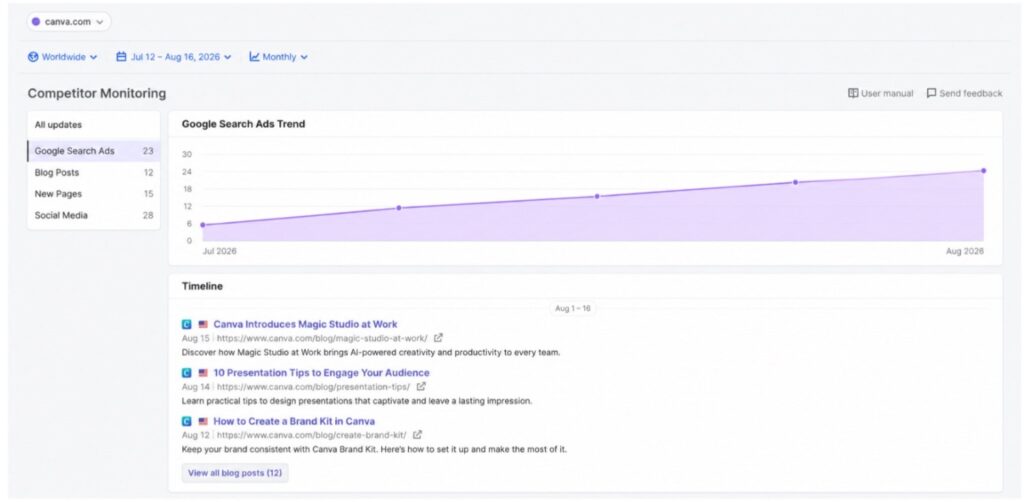
You can set up weekly email reports that summarize everything your competitors did in the past week. This way, you don’t have to manually check anything. It comes straight to your inbox.
I find this especially useful for tracking content strategy changes. When a competitor suddenly starts publishing 2-3 blog posts per week when they used to do 1 per month, something changed in their strategy. Maybe they hired a content team. Maybe they are pushing for a specific keyword cluster. Either way, you want to know about it.
To set it up:
Go to Traffic & Market. Enter your domain and competitors list. If you already have a saved list, click the bell icon (which is not set up) as shown in the image below.
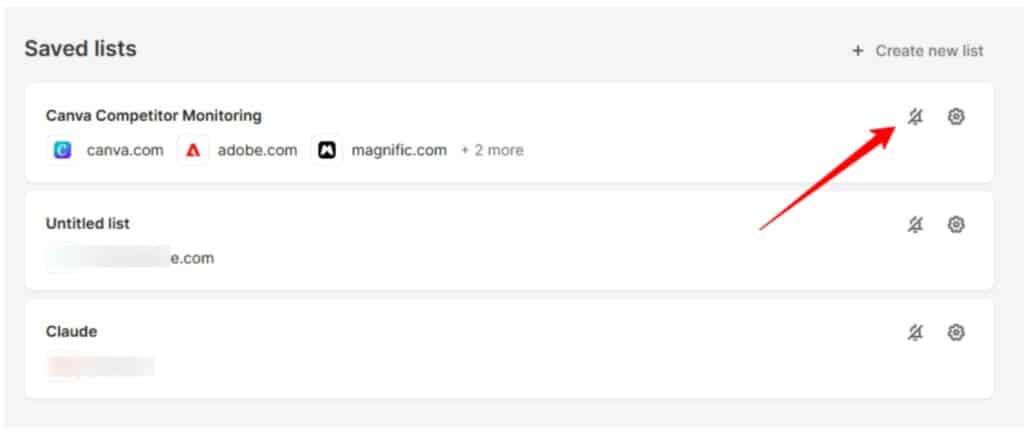
You can enable email and Slack notifications (after connecting your account) and get updated on your competitors’ traffic shifts, new pages, ad activity, and more.
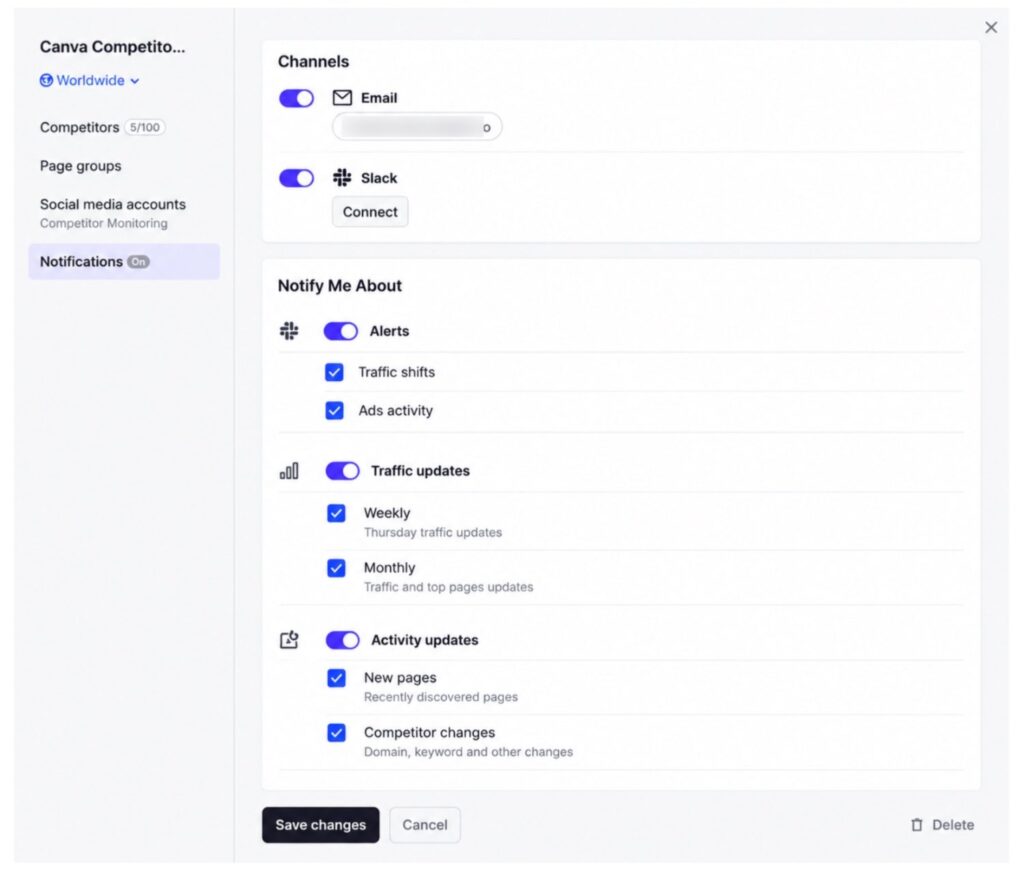
Without the Traffic & Market Toolkit subscription, you are limited to 100 requests per day and cannot export reports. Historical data is also limited to 3 months. With the subscription, you get 6 months of historical data and full export capabilities.
Semrush One: Your All-in-One option for Competitive Analysis
If you want to avoid buying separate toolkits, Semrush One is the bundle plan that combines the SEO Classic toolkit with the AI Visibility Toolkit under one subscription.
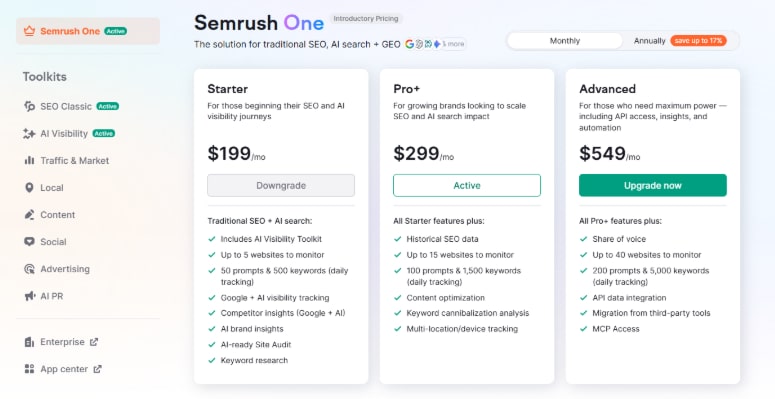
Semrush One comes in three tiers:
| Features | Starter | Pro+ | Advanced |
|---|---|---|---|
| Monthly Price | $199/month | $299/month | $549/month |
| Annual Price | $165.17/month | $248.17/month | $455.67/month |
| Websites to Monitor | 5 | 15 | 40 |
| Daily Keywords Tracking | 500 | 1,500 | 5,000 |
| Daily Prompts | 50 | 100 | 200 |
The advantage of Semrush One is that you will get AI Visibility and features from SEO Classic plans into one single subscription. You won’t need to buy a separate AI Visibility toolkit (which is $99/month per domain).
However, Traffic Analytics, Advertising Research, and Competitor Monitoring still require separate toolkit subscriptions even with Semrush One. They are add-ons but come with a 7-day trial on each (not included with AI Visibility toolkit).
If you are new and have never tried Semrush before, you can get an exclusive 14-day Semrush One free trial through our partnership link. The regular trial for SEO Classic and One is 7 days only.
Our team has also done a detailed tutorial on how you can use Semrush One. Get a complete walkthrough here:
Already a Semrush user? Get up to a 17% discount with our Semrush coupon code.
Free Semrush Competitive Analysis Tools
You don’t need a paid account to start. Semrush offers limited free access to several competitor analysis tools:
- Domain Overview: 10 queries per day. Enough to check a few competitors’ high-level metrics.
- Organic Research: 10 queries per day. You can look up competitor keywords with limited results.
- Position Tracking: 10 keywords. Useful for tracking a small number of critical keywords.
- Backlink Analytics: 10 queries per day. Basic backlink data for any domain.
- Backlink Analytics: 10 queries per day. Basic backlink data for any domain.
The free limits are restrictive, but they are enough to get a taste of what each tool does. If you are just starting out and want to understand the basics of your competitors before committing to a paid plan, the free tier works.
Conclusion: Track, analyze, and outrank competitors with Semrush
So that’s how I do my competitive analysis with Semrush. Don’t try to use every tool at once. Start with your top 3 business competitors. Run them through Keyword Gap and Backlink Gap first to find the quick wins.
The part most people skip is ongoing monitoring. Your competitors are publishing content, launching ads, and building links every single week. If you only check once a quarter, you are already behind. Set up Position Tracking and Competitor Monitoring so you catch changes as they happen, not months later.
One more thing. Always separate your business competitors from SERP competitors before you start. Analyzing a content site the same way you analyze a direct rival wastes time and leads to wrong conclusions.
You can start free with limited daily queries or grab our exclusive 14-day trial to unlock the full toolkit from day one.
Affiliate Disclosure: When you purchase through links on our website, we may earn an affiliate commission at no extra cost to you.
FAQs
No single tool, but Semrush offers a set of competitive analysis tools including Domain Overview, Keyword Gap, Backlink Gap, Organic Rankings, Advertising Research, and AI Visibility. Each covers a different aspect of competitor research.
Enter your domain in Domain Overview and scroll down to the Main Organic Competitors section. Semrush identifies competitors based on shared keyword rankings.
Semrush offers 10 free queries per day for Domain Overview, Organic Research, and Backlink Analytics. Position Tracking allows 10 free keywords. Limited but enough to get started.
Do a full analysis monthly and use Position Tracking and Competitor Monitoring for weekly updates. Competitors change strategies constantly, so one-time analysis is never enough.
The AI Visibility Toolkit, included with Semrush One plans, tracks competitor mentions, citations, and visibility scores across ChatGPT, Gemini, Google AI Overviews, and other AI platforms.
