
I have been using Semrush for the past 8 years now as part of my daily SEO workflow at DemandSage. At this point, I have tested practically every tool it offers.
If I am counting right, Semrush offers 55 purpose-built tools inside its suite. By purpose-built, I mean that not every tool is equally useful for every user.
Some of the Semrush tools are built for agencies that manage dozens of clients, while others are niche-based tools that you might touch once a year.
However, there are some tools that you might need to use daily or very often if you are like-minded. In this blog post, I have listed 7 Semrush tools that I use daily, and you must know how to use them, especially if you are a beginner.
New to Semrush? Start with Semrush One 14-day exclusive free trial through the DemandSage X Semrush partnership link. The tools I am going to explain exist in Semrush One; no add-on needed to purchase separately.
Key Takeaways
- Semrush has 55+ tools, but these 7 cover the core SEO workflow.
- Domain Overview checks any website’s authority, traffic, and backlinks.
- Site Audit catches technical SEO issues. Run it monthly at minimum.
- AI Visibility tracks your brand in ChatGPT, Gemini, Perplexity, and Google AI Overviews.
- Keyword Magic Tool has 26 billion+ keywords across 142 countries.
- Position Tracking monitors rankings daily, now with AI search tracking included.
- Keyword Gap shows keywords your competitors rank for and you don’t.
- Backlink Analysis and Backlink Gap help you find competitors’ link sources.
- All 7 tools come with a Semrush One subscription. 14-day free trial is available.
Affiliate Disclosure: Some links on this page are affiliate links, which means we may earn a commission if you make a purchase through them, at no extra cost to you.
Our recommendations and opinions remain independent and are based on our editorial assessment.
7 Semrush Tools You Should Know About
Before I start, here is a quick overview of all the tools I am going to use and their purpose:
| Tool | What It Does |
|---|---|
| Domain Overview | Overview of any domain’s SEO health |
| Site Audit | Technical SEO health check |
| AI Visibility | Track brand presence in AI/LLM results |
| Keyword Magic Tool | Keyword discovery & research |
| Position Tracking | Daily rank monitoring |
| Keyword Gap | Compare keyword profiles vs competitors |
| Backlink Analysis | Evaluate & build backlink profiles |
All of these Semrush tools are interconnected. You collect data from one and feed it into the next to get actionable insights. That is what makes Semrush different from other SEO tools and software. You don’t need separate tools for different purposes.
If you don’t want to read text-by-text and know how they work. Here is an explanatory video tutorial done by our team. Check out all the tools in action.
Now, let’s go through them one by one.
1. Domain Overview
Semrush Domain Overview is one tool that I open almost every day. The moment I see a competitor or a new site ranking for one of my keywords, I check their site’s authority, traffic, and backlinks.
To check this, simply copy and paste your competitor’s site link, and you’ll get metrics like this.
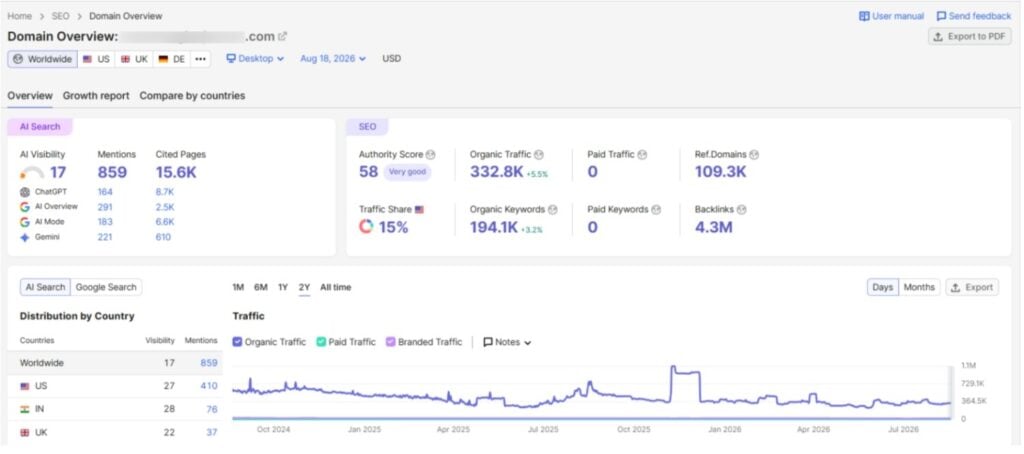
Here is what Domain Overview shows you:
- Authority Score: This is Semrush’s proprietary metric that estimates a domain’s overall SEO strength from 0 to 100. It considers organic traffic, backlinks, referring domains, and other metrics. Anything above 40 is good, but an AS ranging between 60 and 80 is very strong. Sites above 80 are global giants.
- Organic Traffic: It is the estimated monthly visits from organic search. This number comes from Semrush’s data models, not actual analytics. So you can treat it as directional.
- Paid Traffic: Paid traffic is estimated monthly visits from paid search ads and PPC campaigns.
- Backlinks: The total number of backlinks pointing to the domain (along with the number of referring domains).
- Organic Keywords: The number of keywords that bring users to the domain through Google’s top 100 organic results.
- Paid Keywords: The number of paid keywords that bring paid traffic to the domain.
If you are on the Semrush One plan like me, you will get one more metric: AI Search. It shows AI visibility of sites across ChatGPT, AI Overviews, AI Mode, and Gemini. Along with that, you get to see the number of mentions and cited pages when someone is looking for an answer on these LLMs.
One important thing: Semrush selects Worldwide as the default when you add a site in Domain Overview. So make sure to choose your target country (like US or UK) to see exact competitive metrics for that only. Also, you can check metrics for a specific page or URL.
What to Do with Domain Overview Data?
When you check a competitor here, you must focus on the traffic trend over 6 months (because Google releases core updates 3-4 times a year, so strategies change over time). If your competitor’s traffic is dropping consistently, they are likely losing keyword positions or have been affected by an update.
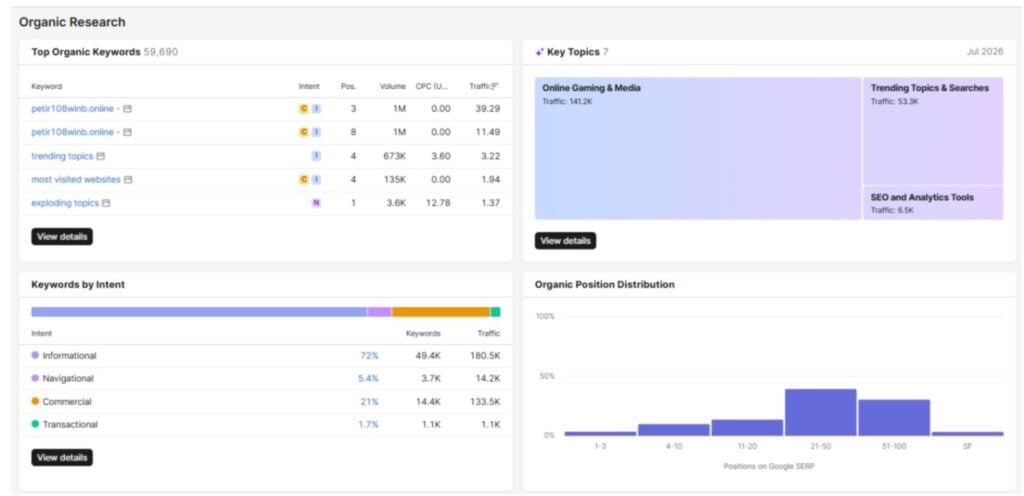
This is where you should target the same keywords and get an edge over them.
You can also compare keyword count against traffic. A site with 200K keywords but 50K traffic has most pages ranking on page 2 or beyond. They have the content but not the positions. With better, more focused content, you can outrank them.
The Top Competitors widget is useful too. It shows sites competing in your keyword space based on overlap. Not all of them are your direct business competitors. Sometimes you find sites you have never heard of here. Those are worth checking in Keyword Gap (covered later).
For evaluating guest post or link prospects, check their Authority Score and traffic here first. Low authority and declining traffic mean it is not a good outreach target.
2. Site Audit
I have multiple sites. Not each of them operates at the same scale, so I need to keep a tab on them. I run Site Audit on all of them, at least once a month. If a site is going through a redesign or migration, I run it weekly.
Site Audit tool crawls your website exactly like search engines do. It checks every page for technical issues and flags what is broken. It also shows how you can fix them.
How to Set Up a Site Audit Project in Semrush
Start by going to SEO > Site Audit and create a new project. Enter your domain, set your crawl scope (you can set the limit to specific subdomains or subfolders). For most sites, the default settings work fine.
You can schedule recurring crawls (weekly is ideal), so Semrush automatically re-crawls your site. Weekly tracking shows you if issues are getting fixed or piling up.
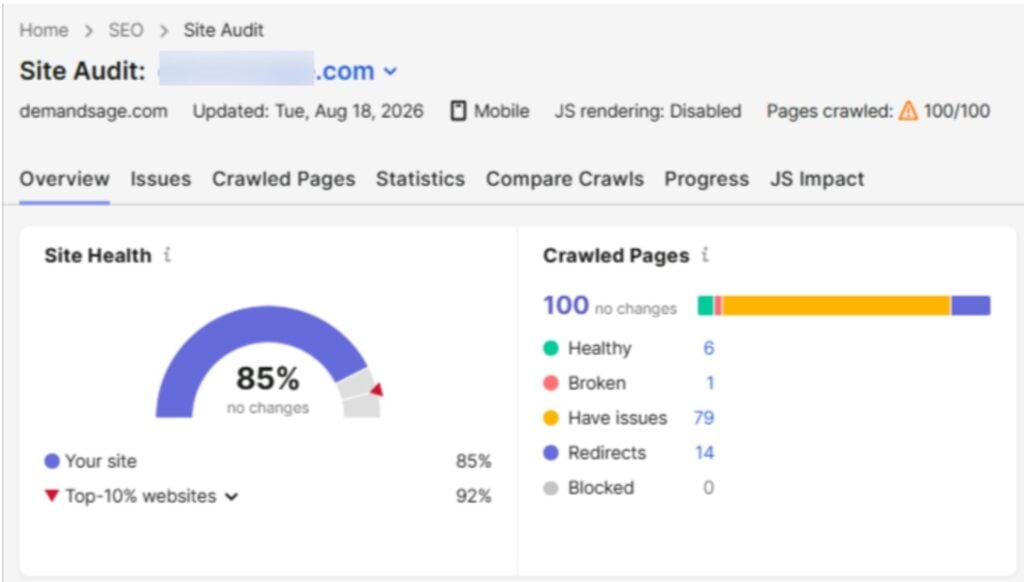
Once the crawl finishes, Site Audits shows the Site Health Score out of 100. This is a calculated score based on the number and severity of issues found. Anything above 80 is good. Below 60 means there are issues, and you have work to do.
The audit breaks issues into three categories:
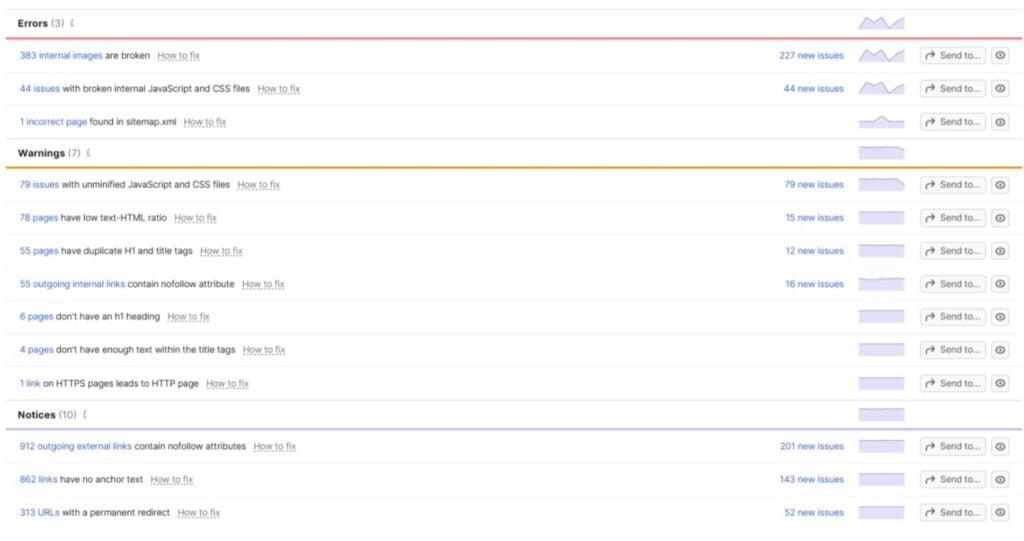
- Errors: Broken pages (4xx), server errors (5xx), pages with missing title tags, and duplicate content issues.
- Warnings: Slow-loading pages, images without alt text, thin content pages, and redirect chains.
- Notices: Minor issues. These are more like best-practice suggestions. Fix them when you have time. Anyway, they won’t tank your rankings on their own.
What Site Issues Should You Prioritize?
Your website doesn’t have to be a perfect 100. You will need to focus on what actually affects rankings in the SERP:
- Broken Pages: This should be your top priority. If Googlebot finds a 404 or 500 error, it wastes crawl budget and kills any link equity flowing to that page. You must fix or redirect them.
- Duplicate Content: If Semrush flags multiple pages with identical or near-identical title tags or content, you can merge them or add canonical tags. Google does not want to choose between five versions of the same page.
- Crawlability Issues: It matters more than people think. If important pages are blocked by robots.txt or buried behind too many clicks from the homepage, search engines might never index them properly. Check the “Crawlability” section in the audit report for these.
- Page Speed: This is actually a ranking factor, and Site Audit flags pages with slow load times. Semrush pulls Core Web Vitals data and highlights pages that fail Google’s thresholds. These are worth fixing, especially on your money pages.
Sort issues by “Number of pages affected” instead of going through them one by one. If 500 pages are missing meta descriptions, that is one fix at scale.
AI Search Site Audit (New Feature)
Along with the traditional SEO site audit, Semrush launched the AI Search Audit feature. It shows how well your site is optimized for AI search visibility. You can also check if your content is structured in a way that LLM platforms can easily understand and cite.
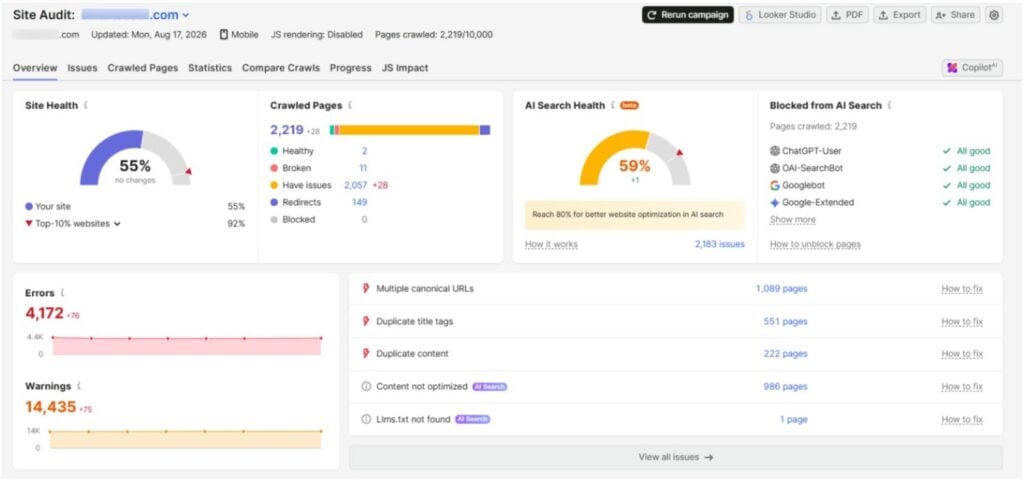
The feature is only accessible with the Semrush One plan. As a result, the site audit shows results for both AI Search and SEO health.
It shows four metrics:
- AI Search Health: The AI search health is a score in percentage that is calculated based on AI search bot crawlability. If they are blocked, your score might be low. Over 80% is good and likely to be more accessible and higher chance of appearing in AI search engines.
- Blocked From AI Search: Shows if all of the AI search bots can crawl your pages. If any of the pages are blocked from these crawlers, you can unblock them by following the steps under “How to unblock pages”.
- Content Not Optimized: The number of pages that are not optimized for AI search.
- Llms.txt Not Found: The number of pages with missing llms.txt files, which is important for AI search engines to understand your content.
If your content needs optimization, you can find issues and fix them manually. Or you can just use the “Optimize with AI” feature and let Semrush do the rest.
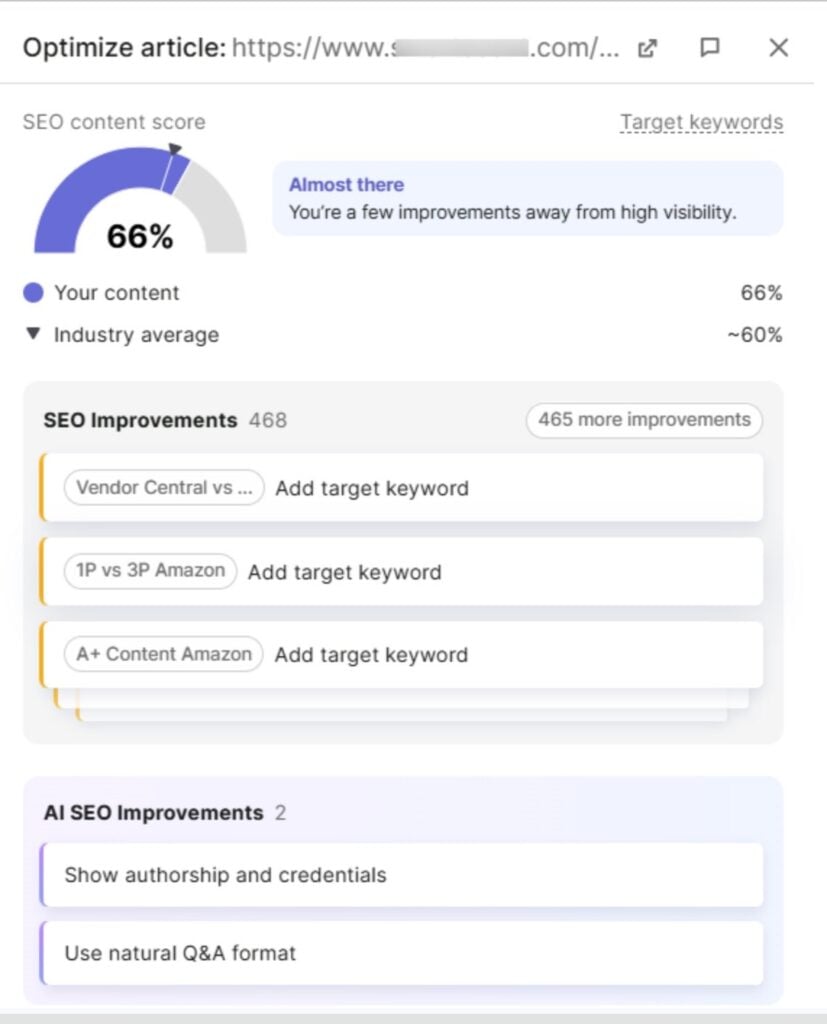
The benefit of using this feature is that you can see your AI search score increase in real time. At the same time, you are also fixing all the optimization issues.
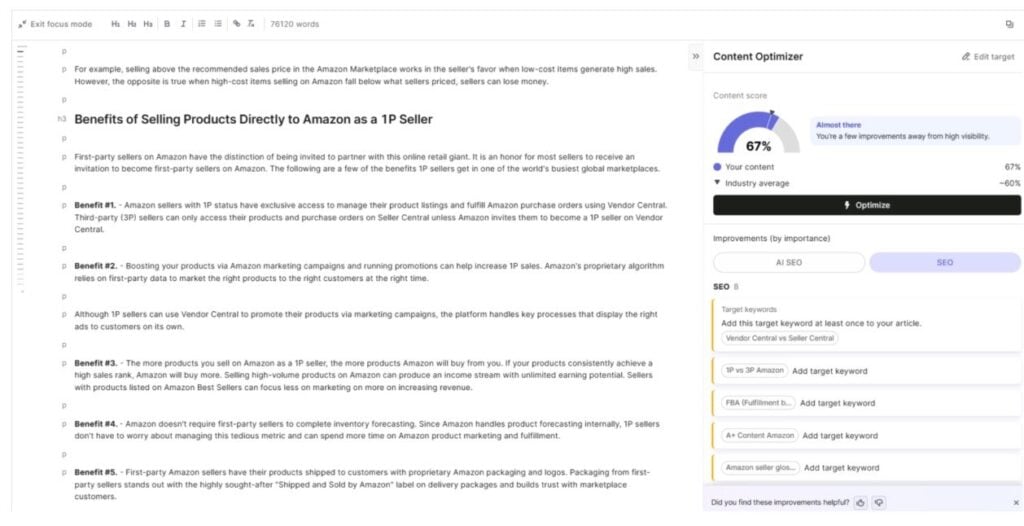
Once done, you can update your page with optimized content and wait for changes to take effect.
Use both audit features together. The traditional site audit keeps your technical SEO healthy. The AI search audit makes sure your content is visible to AI-powered search platforms. Both run through your Semrush One subscription.
3. AI Visibility
This is the newest tool in Semrush. People are finding brands through ChatGPT, Gemini, Perplexity, and Google AI Overviews now. When someone asks a question or has a query on LLMs like ChatGPT or Gemini, the AI generates an answer from web data. If your brand appears, you get traffic. If not, your competitor does.
AI Visibility tracks where and how often your brand shows up in AI answers. It is included with Semrush One. On SEO Classic, it costs $99/month per domain separately.
AI Visibility Score and Brand Monitoring
You can check your site’s AI visibility by going to AI Visibility > Visibility Overview. Just enter your domain URL (or your competitor’s) and click Get Started.
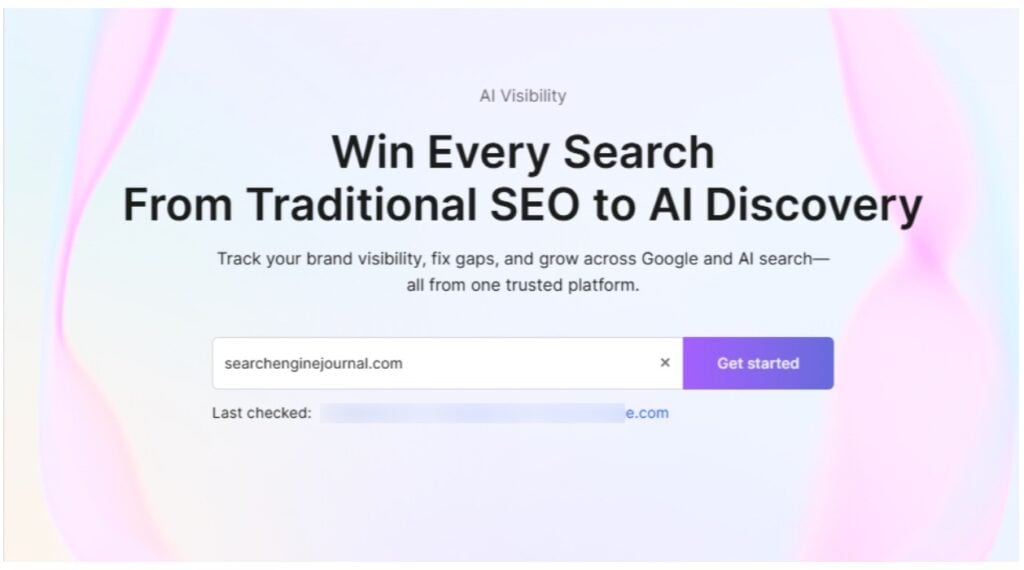
Soon, you will get an AI Visibility Score out of 100. This is calculated based on how often the brand/site appears in AI answers.
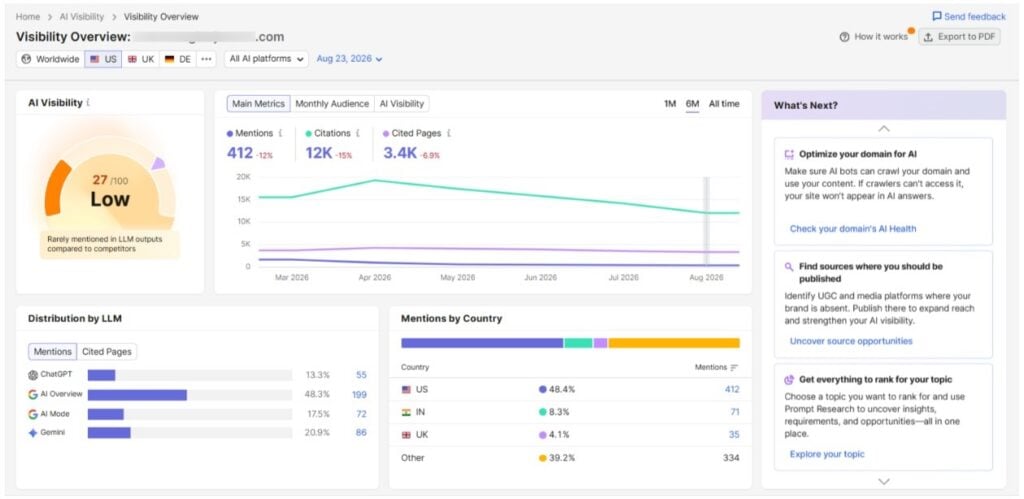
Along with that, you will see the number of Mentions. These are basically the prompts users put in AI search that trigger AI responses mentioning the brand. Citations are the total number of AI responses that cite the domain as a source. Cited Pages are the number of domain pages that are cited in AI search responses.
How to Find Gaps in AI Search?
When you move to the “Competitor Research” tab, you can compare your website’s AI visibility against your top competitors. You can add up 4 competitors and run the analysis side by side.
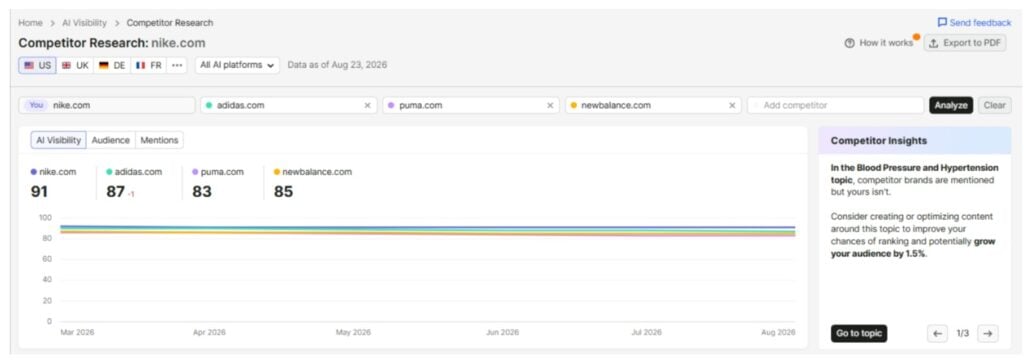
If you and your competitors are in a similar niche and you cover the same keywords, your target should appear more often than your competitors.
When you cover the same topics and keywords as your competitors, yet your competitors appear for user prompts and yours do not, then you are missing factual information that they are covering.
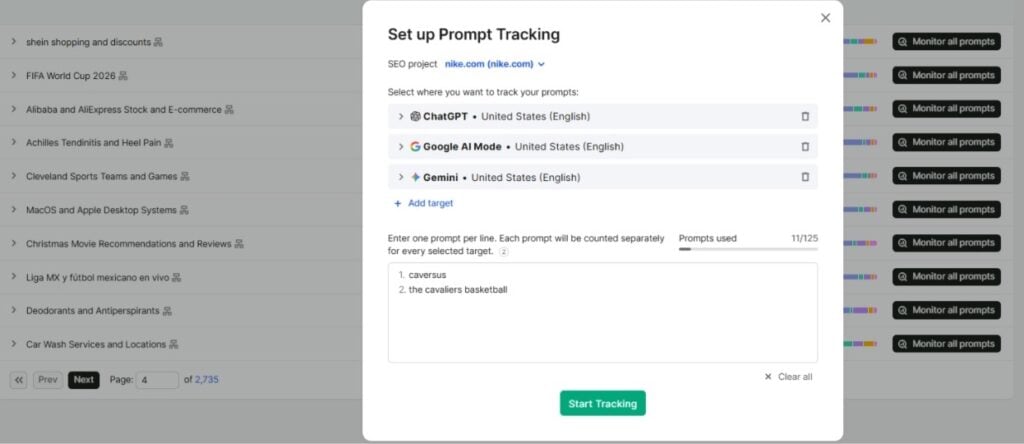
In this case, you will need to close this gap by optimizing the content according to the prompts and answers cited by AI search engines. You can set up Prompt Tracking to monitor specific prompts over time and see if new content improves your visibility.
If you want to get your brand mentioned in AI search, check the complete video below:
4. Keyword Magic Tool
The Semrush Keyword Magic Tool has the largest keyword research database on the market. The tool has a database of 26 billion keywords across 142 countries. I use it almost every day for planning content.
Go to SEO > Keyword Research > Keyword Magic Tool. Enter a seed keyword, pick your target country, and search. Semrush returns a list of related keywords grouped by topic on the left sidebar.
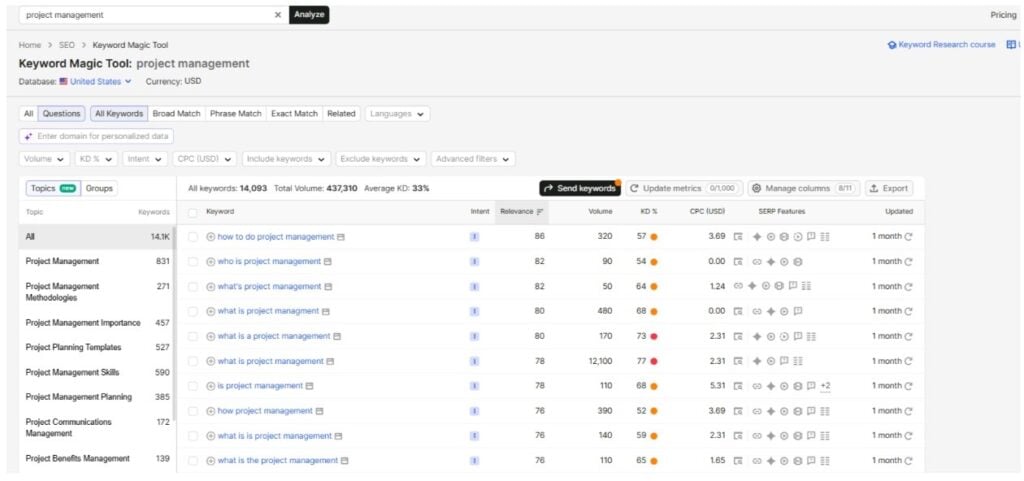
Each keyword shows Search Volume, Keyword Difficulty (KD%), search Intent, CPC, SERP Features, and a 12-month Trend sparkline. KD% under 30 is easy to moderate. Above 60 is highly competitive.
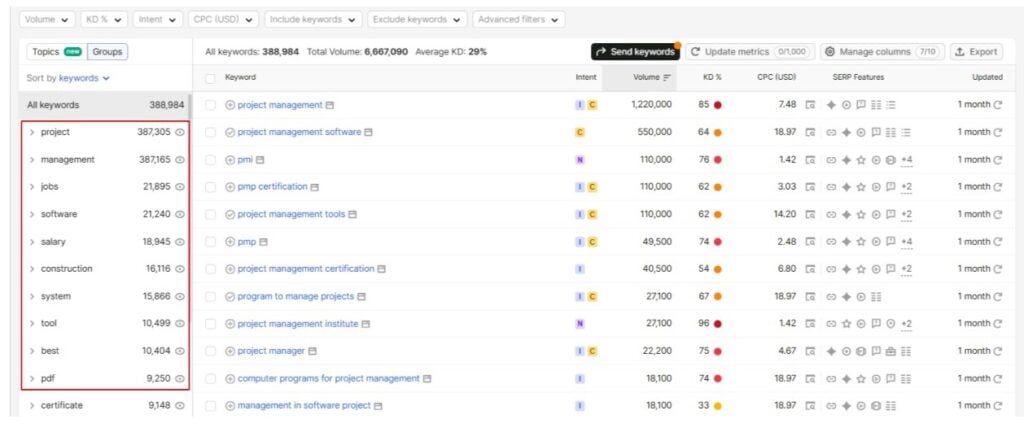
The topic groups on the left sidebar break your seed keyword into subtopics. Searching “project management” gives groups like “software,” “tools,” “skills,” “certification,” and “agile.” Clicking a group filters the list to that subtopic only.
How to Use Semrush Keyword Filters Properly?
The best possible way is to use filters based on what you are looking for. For content ideas, you can set KD% 30 to 50, volume above 100, and intent to “Informational.” On newer sites, you can set KD% to under 20.
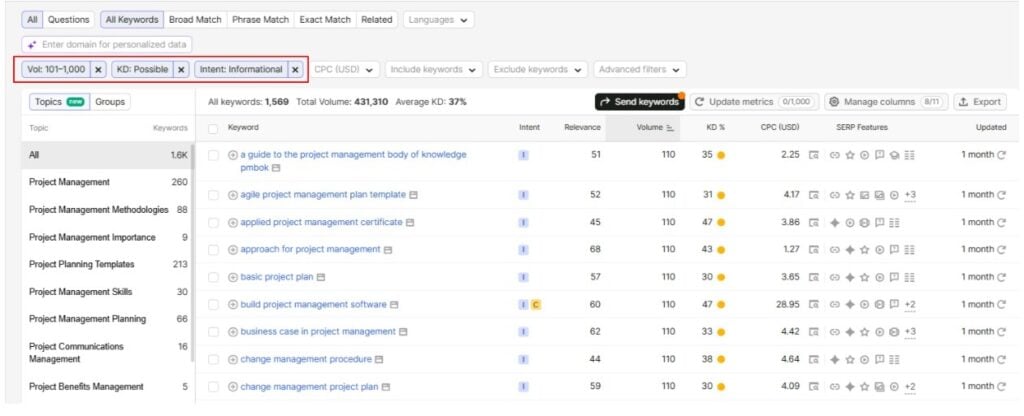
For product pages, you can set intent to “Commercial” or “Transactional” and sort by volume. These convert better but are harder to rank for.
Volume alone doesn’t tell you much. A keyword with 500 searches and buying intent can bring more value than one with 10,000 searches and no purchase intent.
We have also done a video tutorial with Semrush on YouTube. See how its done:
Keyword Exporting and Saving
You can export keywords to CSV or Excel. Or send them to the Keyword Strategy Builder, which groups keywords into topical clusters. I prefer this because you plan content around topics instead of single keywords.
You can also add keywords directly to a Position Tracking campaign from here.
5. Position Tracking
There is no point doing keyword research if you don’t track rankings after publishing. Position Tracking updates your keyword positions daily.
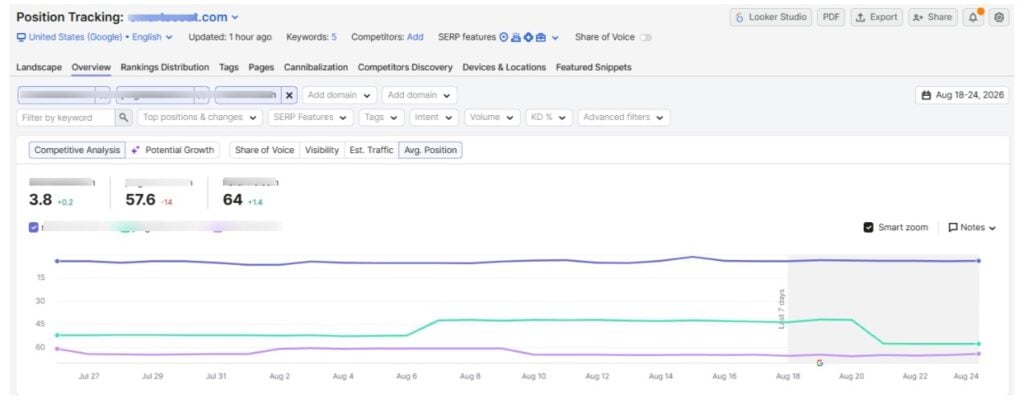
You can find Position Tracking under SEO Site Performance and then you can set up a project. Select your country, device type, and search engine. Then add keywords from Keyword Magic Tool, Keyword Gap, or manually.
Keyword limits depend on the tier: 500/day on Starter, 1,500 on Pro+, and 5,000 on Advanced. Check Semrush pricing for more details.
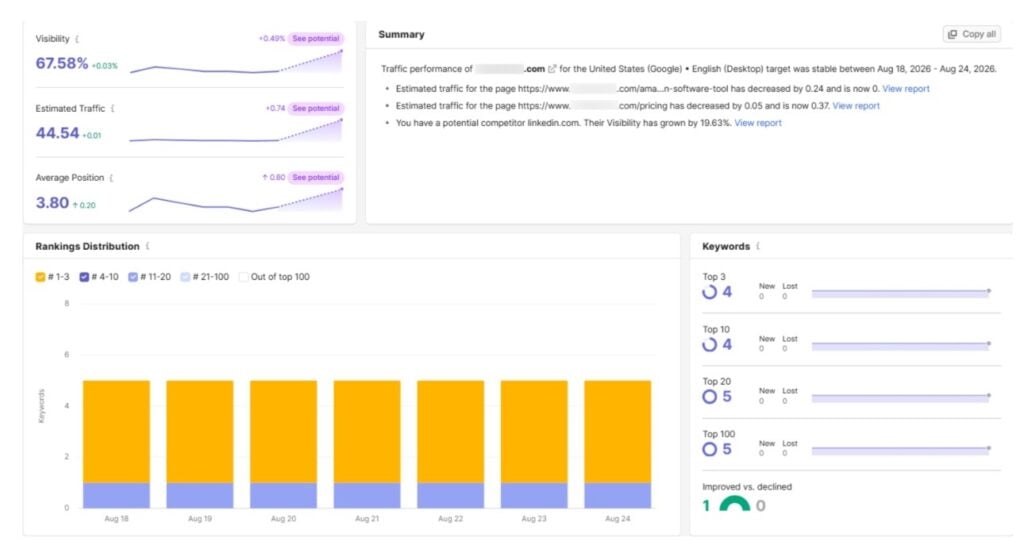
Once running, you see current position per keyword, position changes over time, a combined visibility score, featured snippet ownership, and estimated traffic.
The Rankings Distribution tab shows how many keywords sit in the top 3, top 10, top 20, and beyond. If most are in positions 11 to 20, those pages are close to page 1. Focusing on them usually gives the best return.
How to Track Competitors Side by Side?
You can add up to 20 competitors to the same project. Semrush tracks their positions for your keywords alongside yours. If a competitor jumps from position 8 to 2, you can check what changed on their page and adjust.
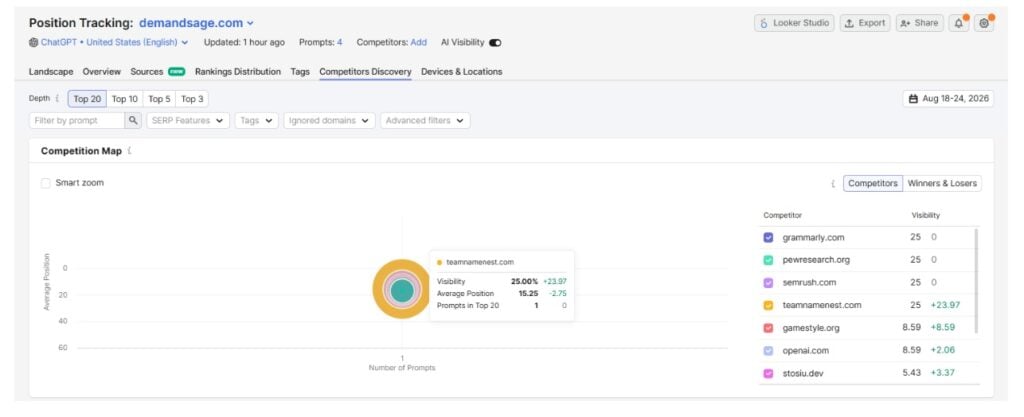
The Competitors Discovery tab shows new domains ranking for your keywords. Winners & Losers shows which competitors gained or lost the most positions over a period.
AI Visibility in Position Tracking
Semrush now shows AI search data inside Position Tracking too. You can see whether your content appears in AI-generated answers for the same keywords you track in Google. The feature is still developing, but it is available on Semrush One plans.
6. Keyword Gap
I covered Keyword Gap broadly in my Semrush review, but it is worth explaining here too.
The tool compares the keyword profiles of up to 5 domains side by side. Go to SEO > Competitive Research > Keyword Gap. Enter your domain and up to 4 competitors. Hit Compare.
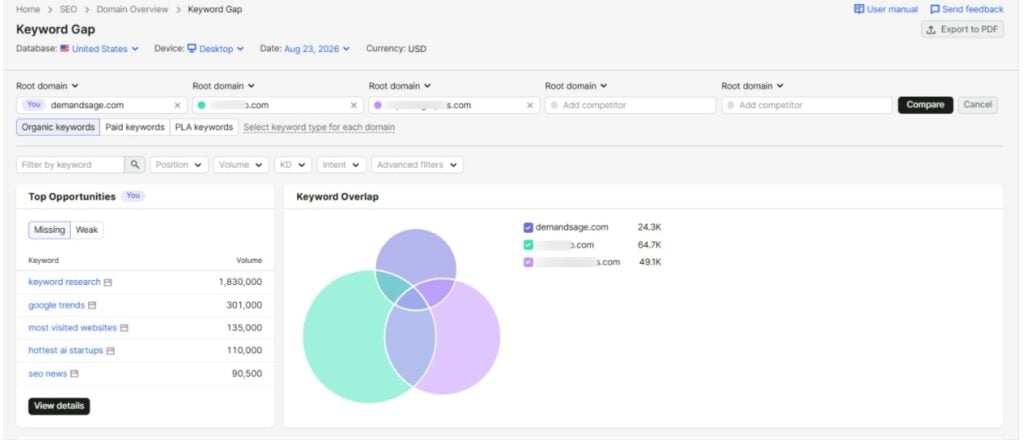
The filter tabs are where the value is:
- Missing: Keywords all your competitors rank for, but you don’t.
- Weak: Keywords where you rank but competitors rank higher. These just need improvement.
- Untapped: Keywords where at least one competitor ranks but you don’t.
- Strong: Keywords where you outrank everyone.
How to Find Opportunity Keywords with Keyword Gap?
Start with Missing keywords and sort them by volume. Look for keywords with decent search volume and KD% under 40. If every competitor covers a topic and you don’t, that is a content gap.
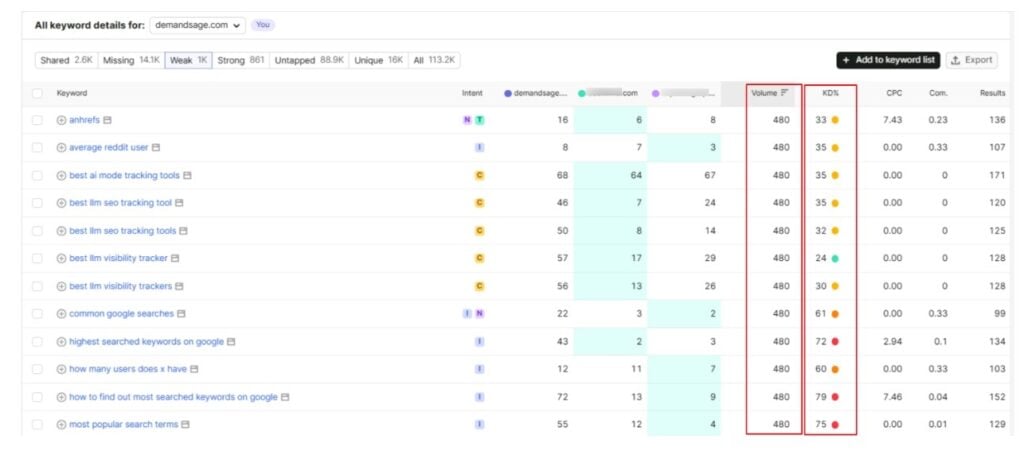
Then check the Weak tab. If you rank at position 15 and a competitor sits at 3, updating your page can close that gap. Refresh content, add more depth, and improve internal linking if the page is already indexed.
Before creating content for every gap keyword, ask yourself: does this keyword match my audience, and does ranking for it help the business? If not, optimize the content accordingly.
7. Backlink Analysis
Backlinks are still one of the strongest ranking factors. You should be checking your link profile and your competitors’ profiles regularly.
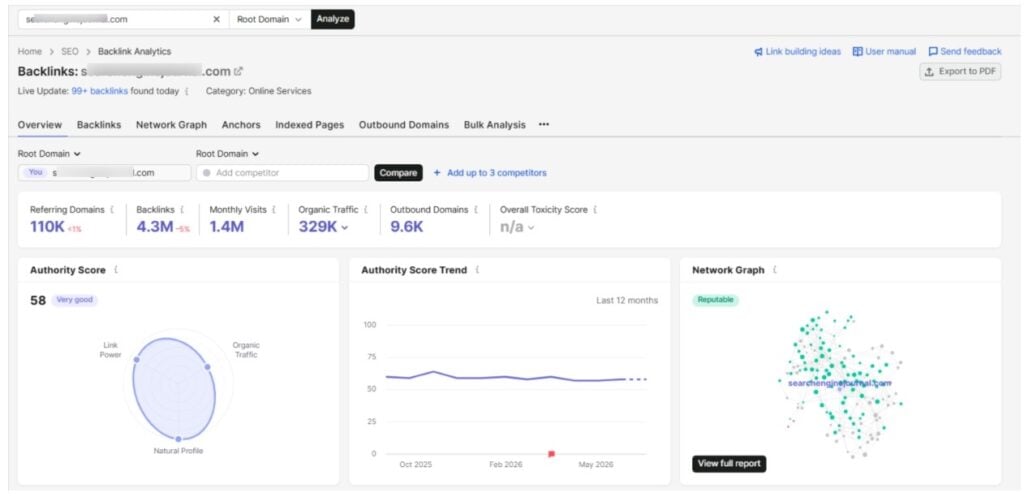
Enter a domain after opening the Backlinks tool under the Link Building section. You will see total backlinks, referring domains, authority distribution, link types (text, image, form), follow vs nofollow ratio, anchor text distribution, and new vs lost links over time.
Referring domains count matters more than raw backlinks since one site linking 500 times is still one referring domain.
How to Analyze a Competitor’s Backlink Profile
Enter a competitor’s domain and look at the referring domains count and authority distribution first. The site might have thousands of referring domains, but most of them below Authority Score 20 are weak. Conversely, 500 referring domains with most above AS 50 is much stronger.
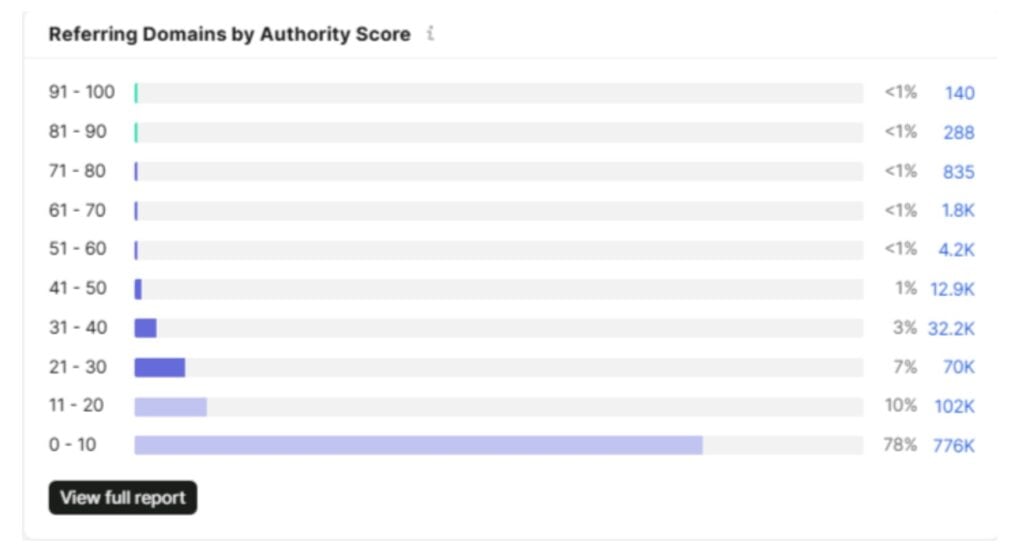
Sort the Referring Domains tab by Authority Score to see their best links. Check what kind of sites link to them: industry blogs, news sites, resource pages, or directories.
The Indexed Pages tab shows which pages have the most backlinks. If their statistics page or free tool page attracts the most links, that tells you what content earns links in your niche.
Backlink Gap: Find Links Pointing to Competitors but Not Your Site
Backlink Gap tool comes under Semrush competitive analysis. You can enter your domain and up to 4 competitors.
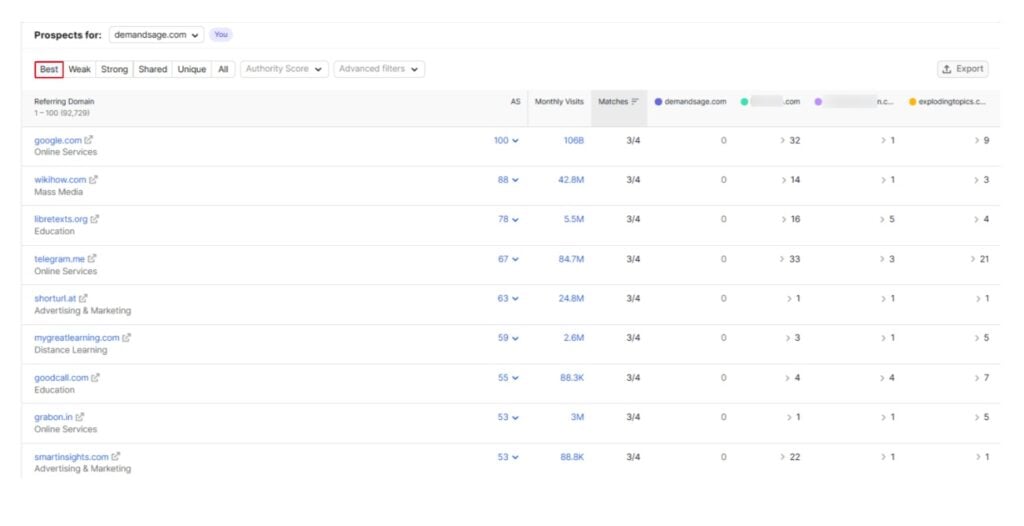
Click the “Best” filter. This shows domains that link to all your competitors but not to you. These sites already link to content in your space. They just haven’t found yours yet. Sort by Authority Score and start outreach from the top.
For each prospect, check what page they link to on your competitor’s site and what anchor text they used. Create something similar or better and pitch it.
The “Weak” filter shows domains that link to competitors more often than to you. You might have additional resources worth pitching to these sites. Backlink Gap data can be exported to CSV for outreach.
Start with Semrush One and Get Access to All These 7 Tools
All 7 tools are available through Semrush One, which bundles SEO Classic and AI Visibility into one subscription.

Here is the breakdown of all Semrush One plans:
| Feature | Starter | Pro+ | Advanced |
|---|---|---|---|
| Monthly Price | $199/month | $299/month | $549/month |
| Annual Price | $165.17/month | $248.17/month | $455.67/month |
| Websites to Monitor | 5 | 15 | 40 |
| Daily Keywords Tracking | 500 | 1,500 | 5,000 |
| Daily AI Prompts | 50 | 100 | 200 |
Starter covers what most individual SEOs and small teams need. Pro+ adds historical data and content optimization. Some tools like Traffic Analytics need separate add-ons even with Semrush One.
If you have never used Semrush, grab the Semrush 14-day free trial through our partnership link. The regular trial is 7 days, so this gives you double the time.
Already using Semrush? Check Semrush coupon codes for up to 17% off annual plans.
Conclusion: Start with These 7 Essential Tools for Better SEO and AI Visibility
If you have access to Semrush One, you don’t need any other tool to optimize your site for traditional SEO and AI search engines.
Even though Semrush has dozens of tools, you only need to learn to use these 7 tools as a beginner. All of them will help you create optimized content and fix issues to rank better in the SERP and get cited in LLM answers.
Start with the 14-day exclusive Semrush One free trial today to use these tools for your website. 2 weeks are enough to decide to know if Semrush is worth the investment.
Affiliate Disclosure: When you purchase through links on our website, we may earn an affiliate commission at no extra cost to you.
FAQs
Over 55 tools across SEO, advertising, content marketing, and competitive research. The 7 in this guide handle the core workflow.
You can get limited free access with 10 queries per day for Domain Overview, Keyword Magic Tool, and Backlink Analytics. Position Tracking allows 10 free keywords. You can also use the 14-day free trial for full access.
SEO Classic has traditional SEO tools. Semrush One adds AI Visibility, AI search tracking, and an AI-ready site audit.
You must run a site audit once a month at minimum. Do weekly audits if your site has 1,000+ pages or is going through changes. You can schedule recurring crawls.
Yes, the AI Visibility toolkit tracks your brand across ChatGPT, Gemini, Perplexity, and Google AI Overviews. It shows mentions, citations, and competitor gaps.
Semrush uses its own crawlers and clickstream data from 200M+ users. Numbers are directional, not exact. Accurate for larger sites, less reliable for very small niche sites.
